Node types and code languages
A node on the canvas is a block in workflow YAML. Workflows are Pro and must be enabled under Settings → Experimental → Workflows. Choose the smallest block that does the job: an HTTP block for a saved endpoint, an MCP block for a saved tool, and code for a transformation that needs programming. Use AI when the task needs model judgement rather than a fixed rule.
Node types at a glance
| Editor name | YAML kind | Purpose | When to use it |
|---|---|---|---|
| Code | code | Execute an inline snippet in one of seven languages. | Validate input, reshape JSON, calculate a value, or adapt one service’s output for another. |
| Code file | code_file | Read a local source file and execute it with the same code runner. | Keep a larger script in source control or reuse it across workflows. |
| Git file | git | The editor describes a source file in a public repository. Not currently runnable. | Use Code file with a reviewed local checkout until Git file execution is implemented. |
| HTTP endpoint | http | Call a saved HTTP endpoint, or a local mock:// example. | Reuse configured API connections and credentials without writing an HTTP client. |
| MCP tool | mcp | Connect to a saved MCP server and call a named tool. | Use a tool’s published contract and existing transport/authentication settings. |
| AI | ai | Send a system message and prompt to a saved OpenAI-compatible model connection. | Summarise, classify, or interpret information that a deterministic comparison cannot handle. |
| Decision | decision | Evaluate conditions and route to one target block. | Branch on a status, count, threshold, or the presence of a value. |
| Loop | loop | Execute nested body blocks for each item, a fixed count, or while a condition holds. | Process a list or repeat bounded work without copying blocks. |
The editor currently offers eight types; the runner accepts the seven types other than git. A trigger starts a workflow and is configured on Triggers. It is not another runnable block type.
Code and Code file
Code stores source under body. Code file reads the source at path; a relative path is resolved against the workflow’s folder. Both receive input and publish output in the same way.
Code file infers its language from the file extension when language is omitted. Set language explicitly for an unusual extension. Its args value is split on whitespace; shell quoting does not group arguments containing spaces. Use the input file for structured values instead.
The runner copies source into a build directory and executes it with the run’s files/ directory as the working directory. A Code file is not a project launcher: it does not run cargo, npm install, or a .csproj. Do not assume relative imports or companion files will resolve beside the original source. Use explicit paths or a self-contained file.
All supported code languages
These seven language values apply to both Code and Code file. The runtime must be installed on the computer running Termorq; these interpreters and compilers are not bundled with the workflow.
| Language | YAML language | Code file extension | Runner and requirements |
|---|---|---|---|
| Bash | bash | .sh; unrecognised extensions also default to Bash | bash on PATH. Workflow Bash does not switch to the active terminal’s shell. On Windows, install and expose Bash separately. The cookbook’s JSON example also needs jq. |
| PowerShell | powershell | .ps1 | PowerShell, normally pwsh. Runs a file with -NoProfile -NonInteractive -ExecutionPolicy Bypass. |
| Python | python | .py | Python 3, detected as python3 or python. Runs unbuffered with -u. |
| C# | csharp | .cs | .NET SDK 10 or later. Runs a single-file app with dotnet run snippet.cs. |
| Rust | rust | .rs | rustc with Rust 2024 edition support. Compiles with --edition 2024 -O, then executes the binary. |
| JavaScript | javascript | .js, .mjs | Node.js. The runner writes an ES module named snippet.mjs. |
| TypeScript | typescript | .ts | Node.js 22.6+ with native type stripping, or a detected tsx executable when native support is unavailable. The runner selects the command. |
C# uses .NET file-based apps, so no project file is needed for the cookbook’s BCL-only example. Rust runs through rustc directly, so a Cargo dependency such as serde_json is not automatically available. The Rust cookbook example uses only the standard library.
Native Node.js TypeScript execution strips erasable type syntax and does not type-check the program or apply tsconfig.json. Keep snippets within that subset; see Node.js TypeScript support. Termorq prefers native execution when it is available, even if tsx is also installed.
What TERMORQ_INPUT is for
TERMORQ_INPUT is an environment variable containing a file path. It does not contain the JSON itself. Read the file at that path, then parse its content when your block expects JSON. Standard input is closed; reading from stdin is not the workflow input mechanism.
The file is the language-neutral handoff from the workflow engine to your program. It preserves structured values without inserting them into executable source or shell arguments. Code bodies are not template-expanded: putting {{ steps.lookup.total }} inside source does not pass that value to your program. Declare it in uses and read it from the input file instead.
During a full workflow run, uses declares the values a code block needs. Termorq resolves those paths and writes a temporary JSON object containing only those values, preserving their nesting:
uses:
  - trigger.text
  - steps.lookup.total
For example, if those values are available, the file contains:
{"trigger":{"text":"Hello"},"steps":{"lookup":{"total":2}}}The code reads trigger.text and steps.lookup.total from that object. It does not read a flattened text or total property. If uses is empty, a full run does not supply an input file. If a listed value is unavailable, the block fails before its code starts. Listing a path does not create a default value for it.
| Input path | Where it comes from | Typical use |
|---|---|---|
inputs.<name> | Input supplied to the workflow, such as an HTTP request body field. | A caller’s parameters or a list of work items. |
trigger.text | Text supplied by a compatible trigger. | An HTTP text field or the complete Telegram message. |
trigger.args | The remainder after a Telegram command. | Process hello from /trigger hello. |
steps.<block id>.<property> | A property published by an earlier block. | Pass an API result or transformed value forward. |
loop.item, loop.index, loop.count | The current loop context. | Process the current item and identify its pass. loop.index starts at 1. |
secrets.<name> | A declared workflow secret resolved from the secret store. | Supply a credential to trusted code without storing it in YAML. |
The file has mode 0600 on Unix and is removed when the code block finishes. Treat its path as temporary. Keep credentials out of input_sample and diagnostic output. The code runs with the application’s user permissions; choosing only the required uses values is useful data minimisation, not a code sandbox.
Execute step and input_sample
Execute step runs only the selected inline Code block. It supplies Step input directly to the file, rather than constructing the file from uses:
- JSON objects, arrays, numbers, booleans, and null are encoded as JSON. To reproduce a full run, enter the same nested object shape shown above.
- Plain text, including a JSON string value, is written as raw text. Read it as text instead of passing it to a JSON parser. The execution scope also exposes it as
inputs.textandtrigger.text. - Blank input produces
{}.
Input beginning with { or [ is treated as attempted JSON and rejected if it is malformed.
The Code block’s input_sample saves this editor sample in YAML. Save the workflow to persist it. It is a test fixture, not a default input for triggers or full workflow runs. A successful isolated test does not prove that the real trigger supplies every path in uses.
Publishing code output
Write diagnostic messages to stderr and write the result to stdout. With custom output properties declared under outputs, the last non-empty stdout line must be one JSON object. Keep that object on one line, even if earlier diagnostic lines exist.
outputs:
  type: object
  properties:
    message:
      type: string
The code must finish with output such as {"message":"Hello"}. A following block can declare uses: [steps.echo.message], where echo is the producer’s block ID. The runner checks declared custom properties for presence and the declared string, number, boolean, object, or array type. Missing properties, mismatched types, or a non-object final line fail the block.
Without custom output declarations, code may print plain text. The runner records its raw stdout as text, its exit code as exit, and successful execution as status: ok. A non-zero exit fails the block. Use a custom name such as message for structured business data; text is reserved for raw stdout. Do not treat outputs as a filename or expect Termorq to parse every stdout line.
TERMORQ_OUTPUT is a different variable: it points to the run’s files/ directory for artifacts. Writing a file there does not publish a JSON property. TERMORQ_FOLDER identifies the configured workflow folder; it is not the process’s working directory.
HTTP endpoint
Use a saved endpoint for a real network request. The block reuses its API connection and credentials; method and body can supply workflow-specific values. A direct url is currently accepted by the runner only for mock:// examples, not arbitrary network URLs.
HTTP publishes a numeric status and a body string. The recorded body string is capped at 4,096 bytes. When the response is a JSON object, its top-level properties are also available; declare the properties downstream blocks need. Use code to serialise a JSON request body before inserting it into the HTTP block, so quotes and newlines in user input remain valid JSON.
MCP tool
Choose a saved server and tool. Termorq reuses the server’s transport and authentication settings and connects for the call. arguments must resolve to JSON matching the tool’s input contract.
MCP publishes status: ok, a text representation, and the top-level properties of the MCP result. A result may contain content or structuredContent; JSON inside a content[].text string is not automatically flattened into workflow properties. Inspect that tool’s result and declare the fields you need. The cookbook shows how to serialise arguments safely.
AI
Choose a saved model connection, set system and prompt, and optionally set max_tokens. Prompts can include earlier workflow properties. Results include text and model. Open AI editor runs this block in isolation with editable JSON or text input and shows the model response, errors, and published outputs. Its input_sample is saved in YAML when you save the workflow, but only supplies the editor’s sample input; it is not used by triggers or full runs. In the editor, JSON object fields are available as inputs.<name>, nested trigger values as trigger.<name>, and plain text as trigger.text and inputs.text.
If you declare another output property, such as summary, Termorq asks the model to end its reply with one JSON object and reads that final line. A reply without that object fails. Validate model-produced data before using it for a consequential action; use Code or Decision for fixed rules and validation.
Decision
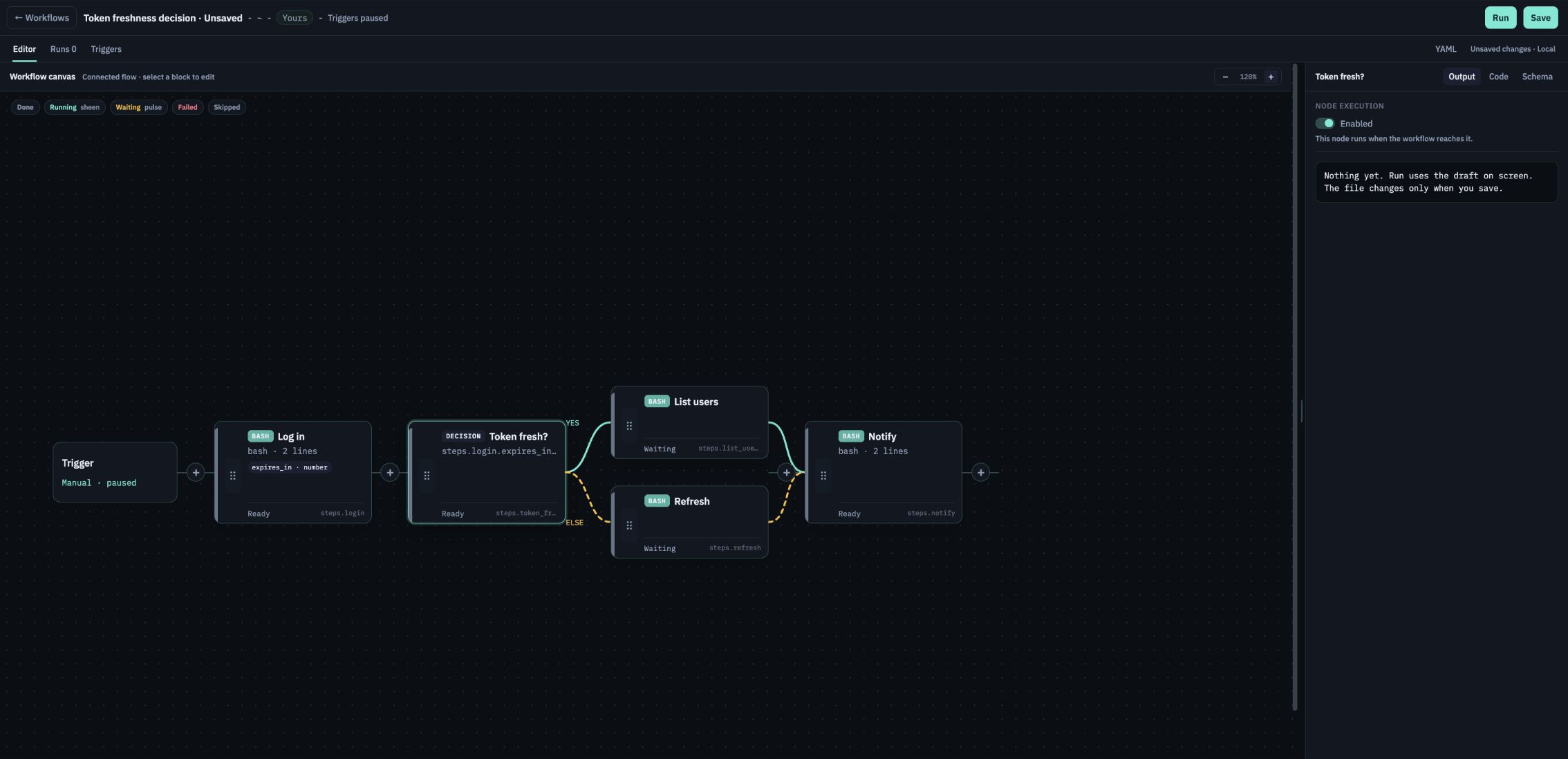
The first true when branch wins; else: true supplies the required fallback. goto names a block ID. Conditions compare workflow values; they are not Bash, JavaScript, or C# expressions. Non-selected targets are skipped. Set the branch blocks’ then values to the shared continuation when both routes should converge.
Loop
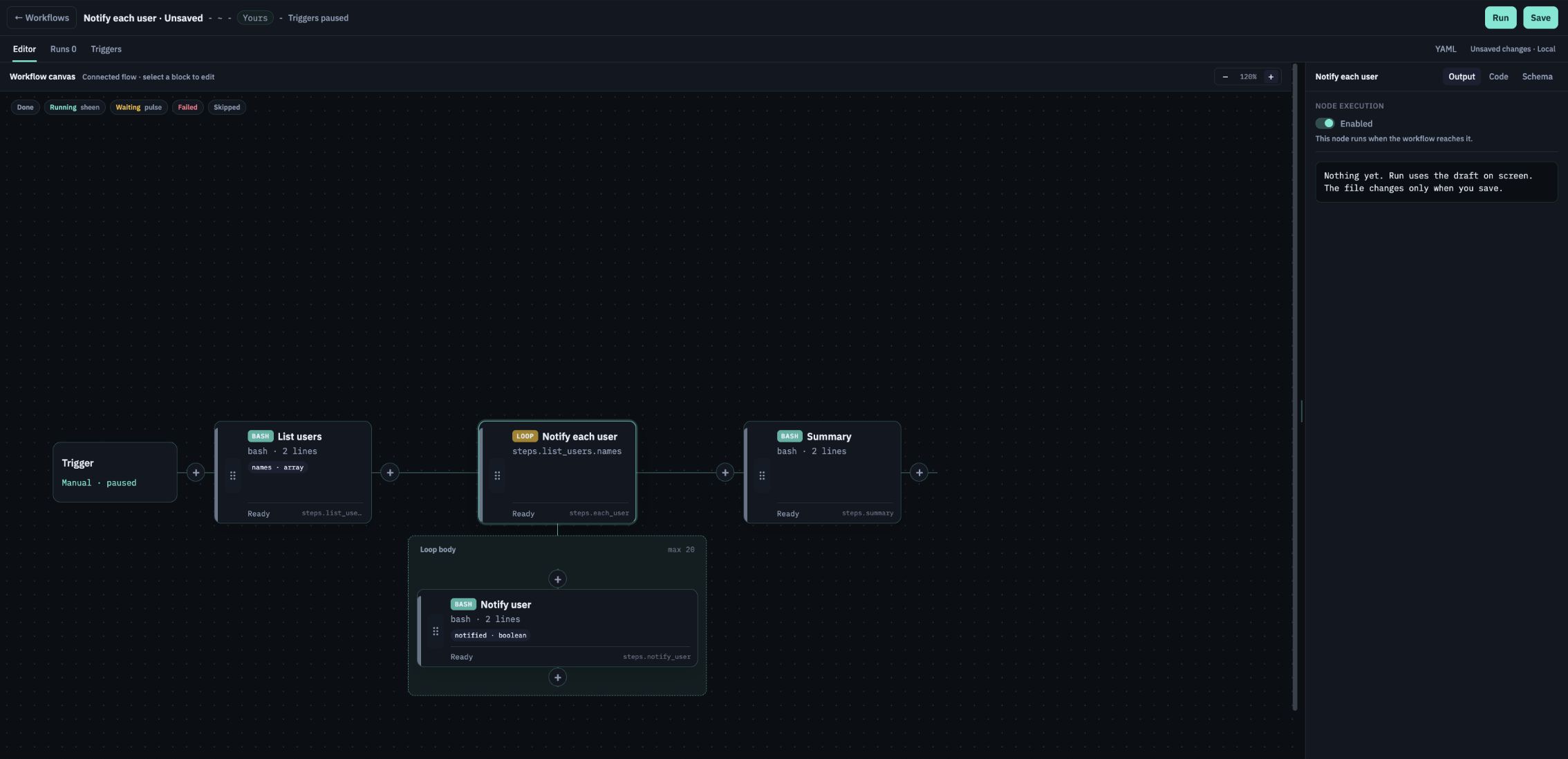
for_each walks an array, repeat runs a fixed count, and while evaluates a workflow condition before each pass. Put runnable child blocks under body. Code in that body can request the loop context through uses.
The default max is 20; the ceiling is 100. A run allows at most 100 loop passes in total, and loops can nest two deep. Keep remote calls bounded. The loop publishes results, an array with each pass’s child outputs keyed by child block ID, plus status and exit.
Git file availability
The editor includes Git file fields for a public repository, ref, path, and inferred code language. The backend currently rejects kind: git, so verification in the editor does not make the block executable. To run that source today, check out and review the desired revision locally, then use Code file. It supports the seven languages listed above.