Code and block examples
Pro — Workflows are a Pro feature. Upgrade in the app.
These examples use the input and output contract. TERMORQ_INPUT contains a path. Read that file; do not parse the environment variable itself as JSON. The code runs locally, so install the language runtime listed in Node types and code languages.
Start with a Code block
Create a workflow, switch to YAML, and paste this complete example. Return to Editor, select Echo, open its code editor, and choose Execute step. The saved sample supplies the input for this isolated test.
schema: 1
name: Input and output example
id: input-output-example
blocks:
  - id: echo
    name: Echo
    kind: code
    language: python
    uses: [trigger.text]
    input_sample: |-
      {"trigger":{"text":"Hello from curl"}}
    body: |
      import json
      import os

      with open(os.environ["TERMORQ_INPUT"], encoding="utf-8") as stream:
          data = json.load(stream)
      text = data["trigger"]["text"]
      if not isinstance(text, str):
          raise ValueError("trigger.text must be a string")
      print(json.dumps({"message": text}, ensure_ascii=False))
    outputs:
      type: object
      properties:
        message:
          type: string
The last stdout line is {"message": "Hello from curl"}. The output panel also records exit: 0, status: ok, and the stdout string. Later blocks can request steps.echo.message.
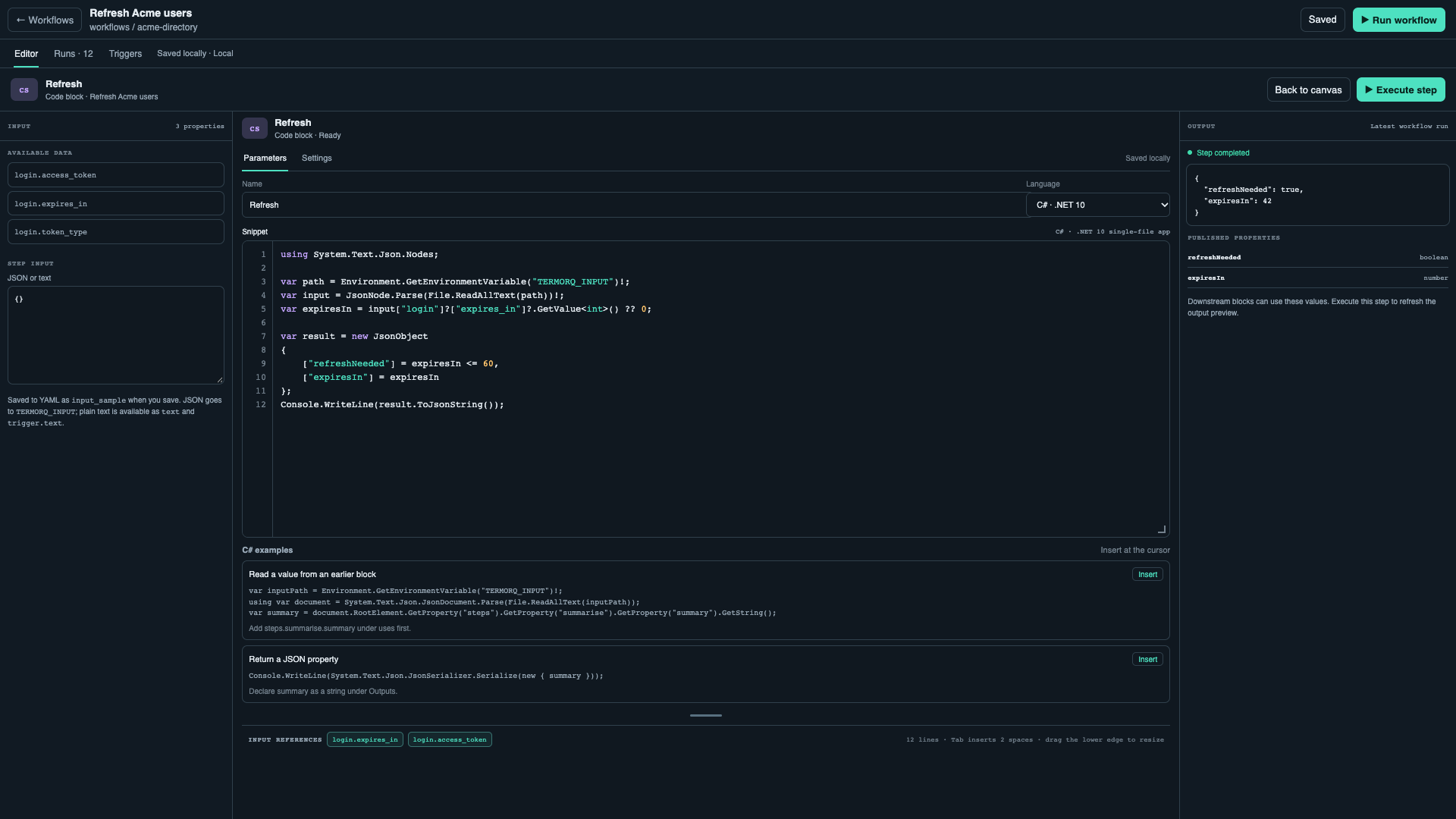
To read an earlier node without typing the paths, use ✦ Autogenerate on the snippet row; see Autogenerate code from an earlier node.
The sample does not supply input to Run workflow. For a full run, configure an HTTP request or Telegram trigger that supplies trigger.text. For HTTP, a JSON request body of {"text":"Hello from curl"} supplies that trigger field; see HTTP request triggers. Keep uses: [trigger.text]: that is what makes the full run’s file contain {"trigger":{"text":"Hello from curl"}}.
Return the required ok property
The last non-empty stdout line from a Code block must be a JSON object. If the block declares an ok output, include it as a Boolean in that object. Captured shell commands add this output automatically. For a block you write yourself, choose the matching Return a successful result example from the editor’s insertable examples, then declare ok as a Boolean output.
For Bash on macOS or Linux, Git Bash, or WSL, append:
printf '%s\n' '{"ok":true}'For PowerShell, append:
@{ ok = $true } | ConvertTo-Json -CompressTo return ok together with another property, choose the Return ok and a property example. Every language has one. It builds the object in a variable, then prints it as one compact line, because the last non-empty stdout line must be a single JSON object. For Bash it needs jq; -c keeps the output on one line:
result=$(jq -nc --arg summary "$summary" '{ok: true, summary: $summary}')
printf '%s\n' "$result"
The PowerShell version uses ConvertTo-Json -Compress, Python uses json.dumps with compact separators, C# uses JsonSerializer.Serialize, and JavaScript and TypeScript use JSON.stringify. The Rust version formats the string directly without escaping, so use it only when summary has no quotes, backslashes, or newlines. Declare ok as a Boolean and summary as a string under Outputs.
Command Prompt has no separate Workflow code language. To run a cmd.exe command from a PowerShell Code block and emit the required object only after it succeeds, use the editor’s Run a Command Prompt command example. It starts the command through %ComSpec% and exits with its failure code.
The output schema must declare ok as a Boolean, for example:
outputs:
  type: object
  properties:
    ok:
      type: boolean
One input, seven languages
The following fences contain source code, not whole workflow documents. Replace the starter block’s language and body with the matching example, or paste the source into the snippet editor. Keep the nested JSON sample and the message output schema for the first six languages. Each validates that trigger.text is a string and publishes it as message. Quotes, newlines, and Unicode remain JSON data.
Bash — language: bash
This example needs both Bash and jq on PATH. jq -c emits one compact line; -e and set -e make parsing or validation errors fail the block.
set -euo pipefail
: "${TERMORQ_INPUT:?TERMORQ_INPUT is missing}"
jq -ce '
  if (.trigger.text | type) == "string" then
    {message: .trigger.text}
  else
    error("trigger.text must be a string")
  end
' "$TERMORQ_INPUT"
PowerShell — language: powershell
Get-Content -Raw reads the whole file, including multi-line JSON. -LiteralPath treats the path as a filename rather than a wildcard expression.
$ErrorActionPreference = 'Stop'
if ([string]::IsNullOrWhiteSpace($env:TERMORQ_INPUT)) {
    throw 'TERMORQ_INPUT is missing'
}
$data = Get-Content -Raw -LiteralPath $env:TERMORQ_INPUT | ConvertFrom-Json
$text = $data.trigger.text
if ($text -isnot [string]) {
    throw 'trigger.text must be a string'
}
@{ message = $text } | ConvertTo-Json -Compress -Depth 10
Python — language: python
This uses the Python standard library only.
import json
import os

with open(os.environ["TERMORQ_INPUT"], encoding="utf-8") as stream:
    data = json.load(stream)
text = data["trigger"]["text"]
if not isinstance(text, str):
    raise ValueError("trigger.text must be a string")
print(json.dumps({"message": text}, ensure_ascii=False))
C# — language: csharp
This is a .NET 10 file-based app with no NuGet dependencies. JsonObject.ToJsonString() escapes output without reflection-based serialization, which can be disabled for file-based apps. No manual JSON string concatenation is needed.
using System;
using System.IO;
using System.Text.Json;
using System.Text.Json.Nodes;

var path = Environment.GetEnvironmentVariable("TERMORQ_INPUT")
    ?? throw new InvalidOperationException("TERMORQ_INPUT is missing");
using var input = JsonDocument.Parse(File.ReadAllText(path));
var value = input.RootElement.GetProperty("trigger").GetProperty("text");
if (value.ValueKind != JsonValueKind.String)
    throw new InvalidOperationException("trigger.text must be a string");

Console.WriteLine(new JsonObject { ["message"] = value.GetString() }.ToJsonString());
JavaScript — language: javascript
The runner executes an ES module, so import is available. This uses Node.js built-ins only.
import { readFileSync } from "node:fs";

const path = process.env.TERMORQ_INPUT;
if (!path) throw new Error("TERMORQ_INPUT is missing");
const data = JSON.parse(readFileSync(path, "utf8"));
const text = data?.trigger?.text;
if (typeof text !== "string") {
  throw new Error("trigger.text must be a string");
}
console.log(JSON.stringify({ message: text }));
TypeScript — language: typescript
Type annotations do not validate incoming JSON. The runtime check below still rejects a missing or non-string value. It uses erasable TypeScript syntax compatible with Node’s native runner.
import { readFileSync } from "node:fs";

type Input = { trigger?: { text?: unknown } };
const path = process.env.TERMORQ_INPUT;
if (!path) throw new Error("TERMORQ_INPUT is missing");
const data = JSON.parse(readFileSync(path, "utf8")) as Input | null;
const text = data?.trigger?.text;
if (typeof text !== "string") {
  throw new Error("trigger.text must be a string");
}
console.log(JSON.stringify({ message: text }));
Rust — language: rust
Rust’s standard library does not include a JSON parser, and this runner invokes rustc rather than Cargo. This dependency-free example processes the input as bytes and publishes its byte count instead. It works for both JSON input and raw text. Choose one of the other languages for a small JSON field transformation rather than writing a JSON parser in a workflow.
use std::{env, error::Error, fs};

fn main() -> Result<(), Box<dyn Error>> {
    let path = env::var("TERMORQ_INPUT")?;
    let input = fs::read(path)?;
    println!("{{\"input_bytes\":{}}}", input.len());
    Ok(())
}
For this Rust example, replace the starter block’s output schema with:
outputs:
  type: object
  properties:
    input_bytes:
      type: number
The output is {"input_bytes":38} for the exact compact sample {"trigger":{"text":"Hello from curl"}} with no trailing newline. The size is UTF-8 bytes, not the number of characters in trigger.text. A following block requests steps.echo.input_bytes.
Reading plain text instead
For Execute step with plain text, read the file as text. This alternative C# source publishes the whole input without parsing it as JSON:
using System;
using System.IO;
using System.Text.Json.Nodes;

var path = Environment.GetEnvironmentVariable("TERMORQ_INPUT")
    ?? throw new InvalidOperationException("TERMORQ_INPUT is missing");
var text = File.ReadAllText(path);
Console.WriteLine(new JsonObject { ["message"] = text }.ToJsonString());
Enter Hello from curl in Step input and keep outputs.message as string. A full run with uses: [trigger.text] produces nested JSON instead, so use the JSON-reading C# example for that full-run contract.
Code file — reuse the source
Save the Python source above as scripts/echo.py inside the workflow’s configured folder. Add this block under the starter workflow’s blocks list:
- id: from_file
  name: Echo from file
  kind: code_file
  path: scripts/echo.py
  language: python
  uses: [trigger.text]
  outputs:
    type: object
    properties:
      message:
        type: string
Its input and stdout contract are the same as inline Code, and the result is steps.from_file.message. Substitute the appropriate source file and language for Bash, PowerShell, C#, Rust, JavaScript, or TypeScript. The extension can infer the language when language is omitted. input_sample and the dedicated Execute step action belong to inline Code; test Code file through a full workflow run.
Git file: there is no runnable kind: git example in this release. Check out and review the repository locally, then use the Code file pattern above. The editor’s Git file entry is not accepted by the backend yet.
HTTP — turn earlier output into a request
The remaining YAML fences are block-list fragments. Add them under the starter workflow’s blocks list, after echo, with matching indentation. They run as part of a full workflow. Use unique block IDs when combining examples.
This offline HTTP block needs no saved endpoint and makes no network request:
- id: ping
  kind: http
  method: GET
  url: mock://users
  outputs:
    type: object
    properties:
      path:
        type: string
      mock:
        type: boolean
It publishes status: 200, path: users, and mock: true, plus the response body string. A later code block can request uses: [steps.ping.status, steps.ping.path] and read data["steps"]["ping"].
For a real request, first save an endpoint named Create message that accepts a JSON object with a message string. The following pair of blocks serialises the earlier message, then supplies that JSON as the saved endpoint’s POST body:
- id: prepare_http
  kind: code
  language: python
  uses: [steps.echo.message]
  body: |
    import json
    import os
    with open(os.environ["TERMORQ_INPUT"], encoding="utf-8") as stream:
        data = json.load(stream)
    payload = {"message": data["steps"]["echo"]["message"]}
    print(json.dumps({"request_json": json.dumps(payload)}))
  outputs:
    type: object
    properties:
      request_json:
        type: string
- id: send_http
  kind: http
  endpoint: Create message
  method: POST
  body: "{{ steps.prepare_http.request_json }}"
  outputs:
    type: object
    properties:
      body:
        type: string
Use the saved endpoint’s JSON content type and authentication settings. The response is available as steps.send_http.body and the numeric steps.send_http.status; its content depends on the actual API. Serialising the complete body avoids breaking JSON when the message contains quotes or newlines. Do not interpolate arbitrary text between JSON quote characters.
MCP — pass JSON arguments to a saved tool
This configuration assumes a saved server named Demo tools with an echo tool that accepts {"message":"..."}. Replace the server and tool with an actual saved tool matching that contract. Add it after the preceding prepare_http block, which has already produced a serialised JSON object:
- id: echo_tool
  kind: mcp
  server: Demo tools
  tool: echo
  arguments: "{{ steps.prepare_http.request_json }}"
  outputs:
    type: object
    properties:
      content:
        type: array
Termorq connects using the saved server configuration. A standard text result appears in steps.echo_tool.content, for example [{"type":"text","text":"Hello from curl"}]; the exact result is tool-dependent. Request uses: [steps.echo_tool.content] in a later Code block to inspect or transform it. Do not assume JSON embedded in a text item has already become top-level workflow properties.
AI — request a structured summary
Save a model connection named Summary model, or replace that name below. This block sends the earlier message in a prompt and publishes a summary property:
- id: summarise
  kind: ai
  connection: Summary model
  system: 'Return a single JSON object with a string property named "summary".'
  prompt: "Summarise this message in one sentence: {{ steps.echo.message }}"
  max_tokens: 128
  outputs:
    type: object
    properties:
      summary:
        type: string
The model might return {"summary":"A greeting sent from curl."}. This is an illustrative response, not a fixed result. A subsequent Code block can request uses: [steps.summarise.summary] and validate data["steps"]["summarise"]["summary"] before using it.
Decision — select one route
This fragment checks the earlier message, executes one branch, and joins at an offline HTTP step. Both branch blocks explicitly continue at joined; the branch not chosen is skipped.
- id: choose
  kind: decision
  branches:
    - when: steps.echo.message != ""
      goto: has_text
    - else: true
      goto: empty_text
- id: has_text
  kind: code
  language: python
  body: |
    import json
    print(json.dumps({"route": "non-empty"}))
  outputs:
    type: object
    properties:
      route:
        type: string
  then: joined
- id: empty_text
  kind: code
  language: python
  body: |
    import json
    print(json.dumps({"route": "empty"}))
  outputs:
    type: object
    properties:
      route:
        type: string
  then: joined
- id: joined
  kind: http
  url: mock://users
With the sample greeting, has_text publishes {"route":"non-empty"} and empty_text is skipped. With an empty string, the fallback publishes {"route":"empty"}. A shared continuation should not require outputs from both branches: one producer did not run.
Loop — transform every item and collect results
This fragment builds a list from the earlier message, greets each item, then counts the collected passes:
- id: names
  kind: code
  language: python
  uses: [steps.echo.message]
  body: |
    import json
    import os
    with open(os.environ["TERMORQ_INPUT"], encoding="utf-8") as stream:
        data = json.load(stream)
    print(json.dumps({"items": [data["steps"]["echo"]["message"], "Ada"]}))
  outputs:
    type: object
    properties:
      items:
        type: array
- id: each_name
  kind: loop
  for_each: steps.names.items
  max: 20
  body:
    - id: greet
      kind: code
      language: python
      uses: [loop.item, loop.index]
      body: |
        import json
        import os
        with open(os.environ["TERMORQ_INPUT"], encoding="utf-8") as stream:
            data = json.load(stream)
        print(json.dumps({"greeting": "Hello " + data["loop"]["item"], "index": data["loop"]["index"]}))
      outputs:
        type: object
        properties:
          greeting:
            type: string
          index:
            type: number
- id: count_passes
  kind: code
  language: python
  uses: [steps.each_name.results]
  body: |
    import json
    import os
    with open(os.environ["TERMORQ_INPUT"], encoding="utf-8") as stream:
        data = json.load(stream)
    print(json.dumps({"count": len(data["steps"]["each_name"]["results"])}))
  outputs:
    type: object
    properties:
      count:
        type: number
The greet input for the second pass is {"loop":{"item":"Ada","index":2}}. Its output includes {"greeting":"Hello Ada","index":2}. steps.each_name.results contains one object per pass, with greet as the child key; each child’s recorded outputs also include its execution metadata. count_passes publishes {"count":2}.
For a fixed count, replace for_each with repeat: 3. For a condition-controlled loop, use while: steps.some_block.more == true and ensure the body updates that value. In those modes there is no array item, so remove loop.item from child inputs and adjust the source. Keep a finite max.
Troubleshooting the contract
| Symptom | What to check |
|---|---|
TERMORQ_INPUT is missing in a full run | Add the required paths under the code block’s uses. A sample in input_sample does not supply them. |
'trigger.text' is not available | Confirm the real trigger supplies text. A manual run does not invent a trigger payload. |
| A JSON parser rejects Step input | Enter JSON with the nesting the code expects, or use the plain-text reader. Raw text is not a JSON object. |
The last non-empty line of code output must be a JSON object | Emit compact JSON on the final line, not an array, pretty-printed object, or diagnostic line. |
| A declared property is missing or has the wrong type | Make the final object match outputs.properties; for example, emit Boolean ok when it is declared, and use message rather than the reserved stdout property text. |
| A Code file cannot import another local file | Source is copied into a build directory. Use an explicit path or make the script self-contained. |
| A runtime cannot start | Install the required runtime, make it visible to the app, and restart Termorq so it can detect it. |