Repo runbooks
Repo runbooks are in Free and Pro. Explain a failed command is Pro. See Editions.
When a tab’s folder is inside a repository, Termorq looks for the tasks the repository already defines and puts them one key away. It only reads files on your disk. There is no network call, and nothing runs until you choose a task.
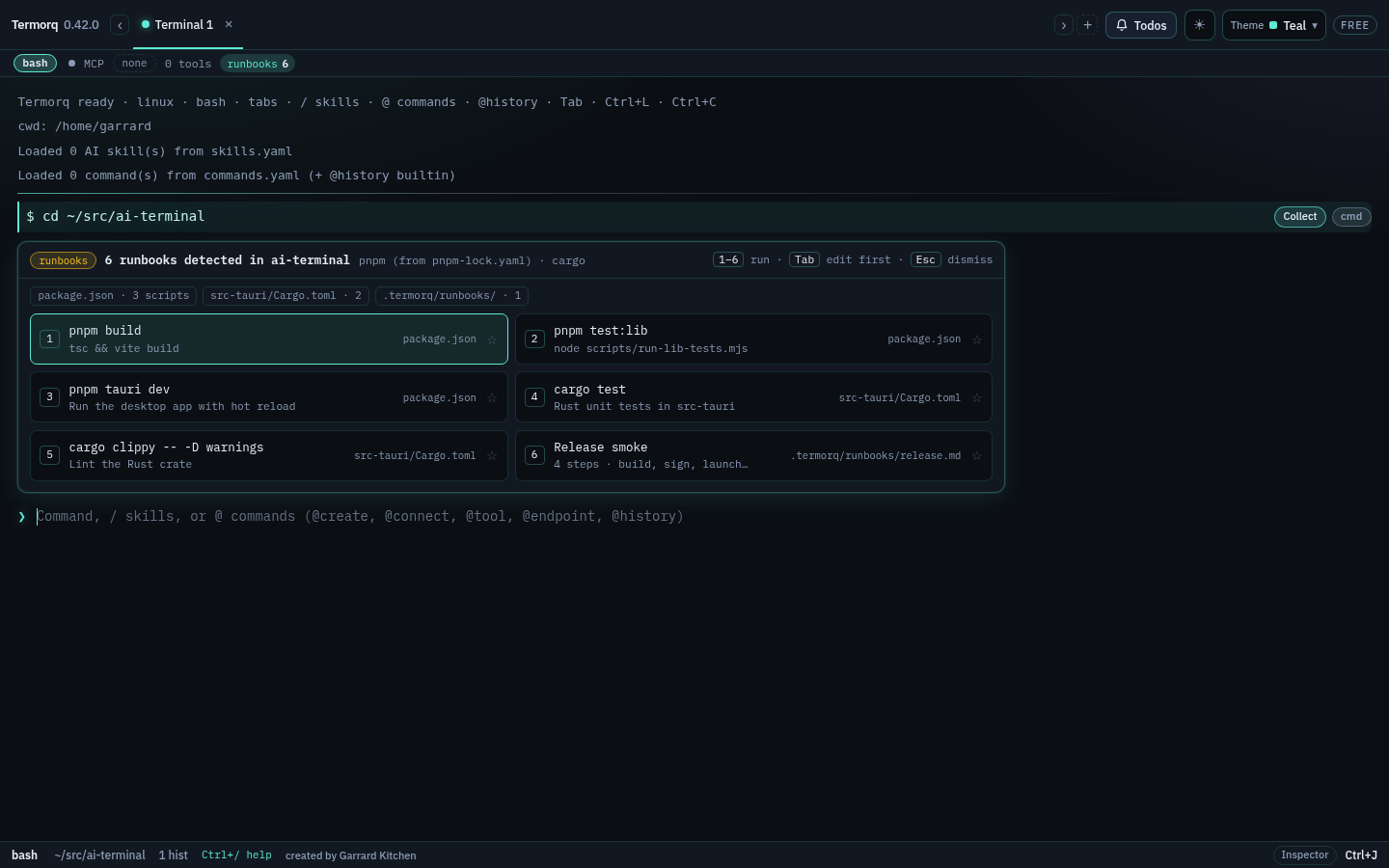
Where the tasks come from
The repository root is the nearest folder with .git, or the tab’s folder when it has one of the files below.
| Source | What becomes a task |
|---|---|
package.json | Each script, in file order. Lifecycle scripts (install, prepare, …) and pre/post hooks are skipped. The package manager comes from the lockfile: pnpm-lock.yaml, yarn.lock, bun.lock/bun.lockb, then package-lock.json. Without a lockfile, the packageManager field decides, else npm |
Cargo.toml | cargo build, cargo test, cargo clippy, cargo run (the only binary or default-run), and cargo run --bin <name> for each binary when there are several. Also read from Cargo.toml one folder down, such as src-tauri/, when the root is not a workspace |
.termorq/ | Runbooks you write for the repository (format below), and Markdown runbooks in .termorq/runbooks/*.md, which open with @md |
Makefile | Targets, with the ## description after the target or the comment above it. Pattern rules, special targets and variables are skipped |
justfile | Recipes, with their doc comment or [doc("…")]. Private recipes (_name or [private]) are skipped. A recipe that takes arguments goes into the prompt for you to finish |
Detection runs in the background, so typing never waits on it. The result is cached by the files’ sizes and change times and refreshed when you change folder, when a command finishes, and when the window gets focus. A file that cannot be read shows on its chip with ⚠ and the reason, and the other files still work.
@run and the repo chip
Type @run (or @runbooks) to open the list with a filter. @run test starts filtered. The runbooks chip in the status strip opens the same list.
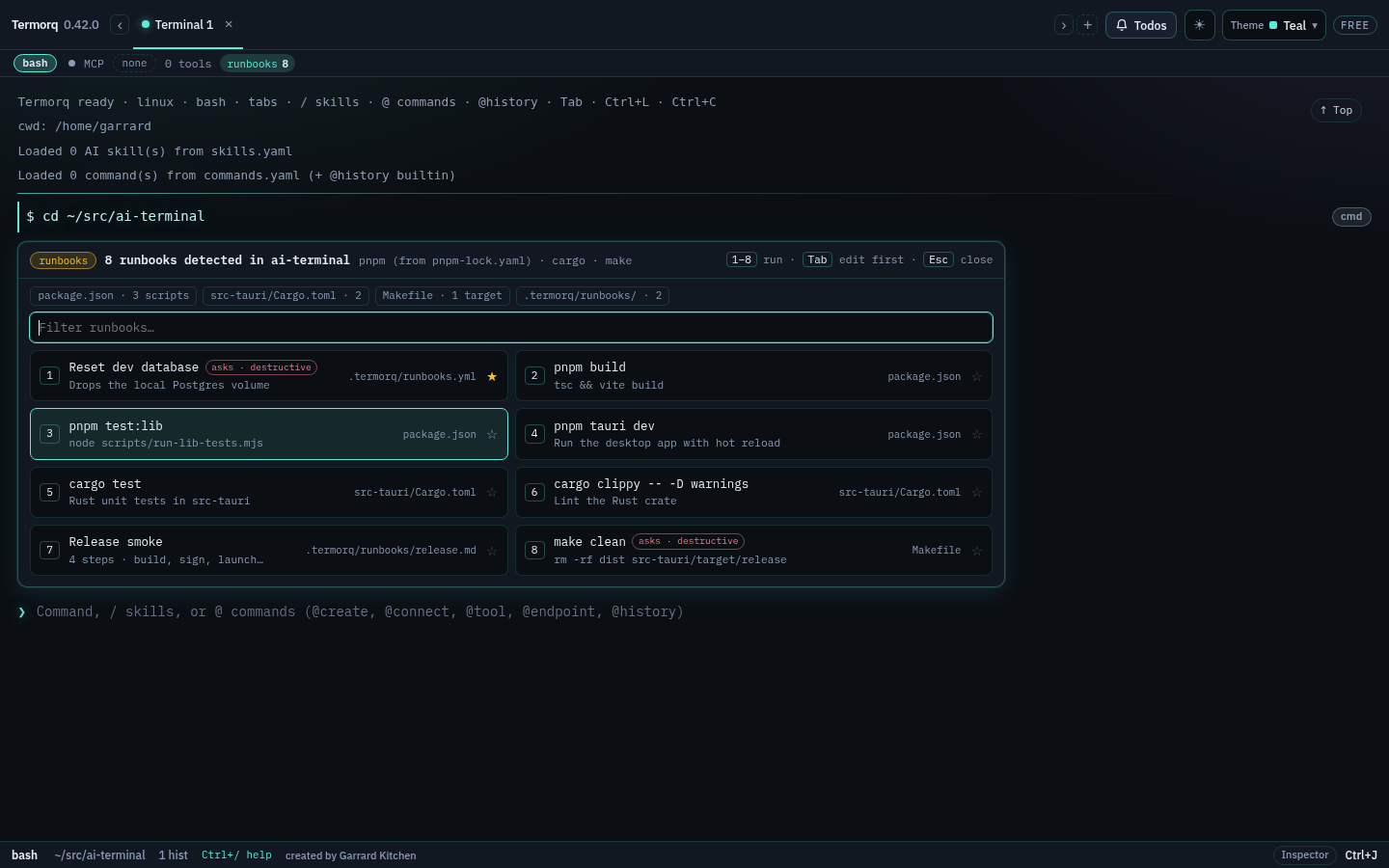
| Key | Does |
|---|---|
1–9 | Run that task (when the filter is empty) |
| Enter | Run the selected task |
| Tab | Put the selected task in the prompt to edit first |
| Arrows | Move through the cards |
| Esc | Close |
☆ pins a task for this repository, and pinned tasks come first. Pins stay on this computer.
The strip after cd appears once per repository per session, when the tab moves into a different repository with tasks. While the prompt is empty, the same keys work; typing anything else dismisses it.
Running a task
A task is typed into the prompt and submitted, like any command, so it shows in the scrollback and history. It runs in this tab when the tab is idle in the task’s folder on this computer. An SSH remote path is not that folder. A tab whose terminal is taken over does not run the task here. Otherwise it opens a new tab there, so your tab never changes folder behind you.
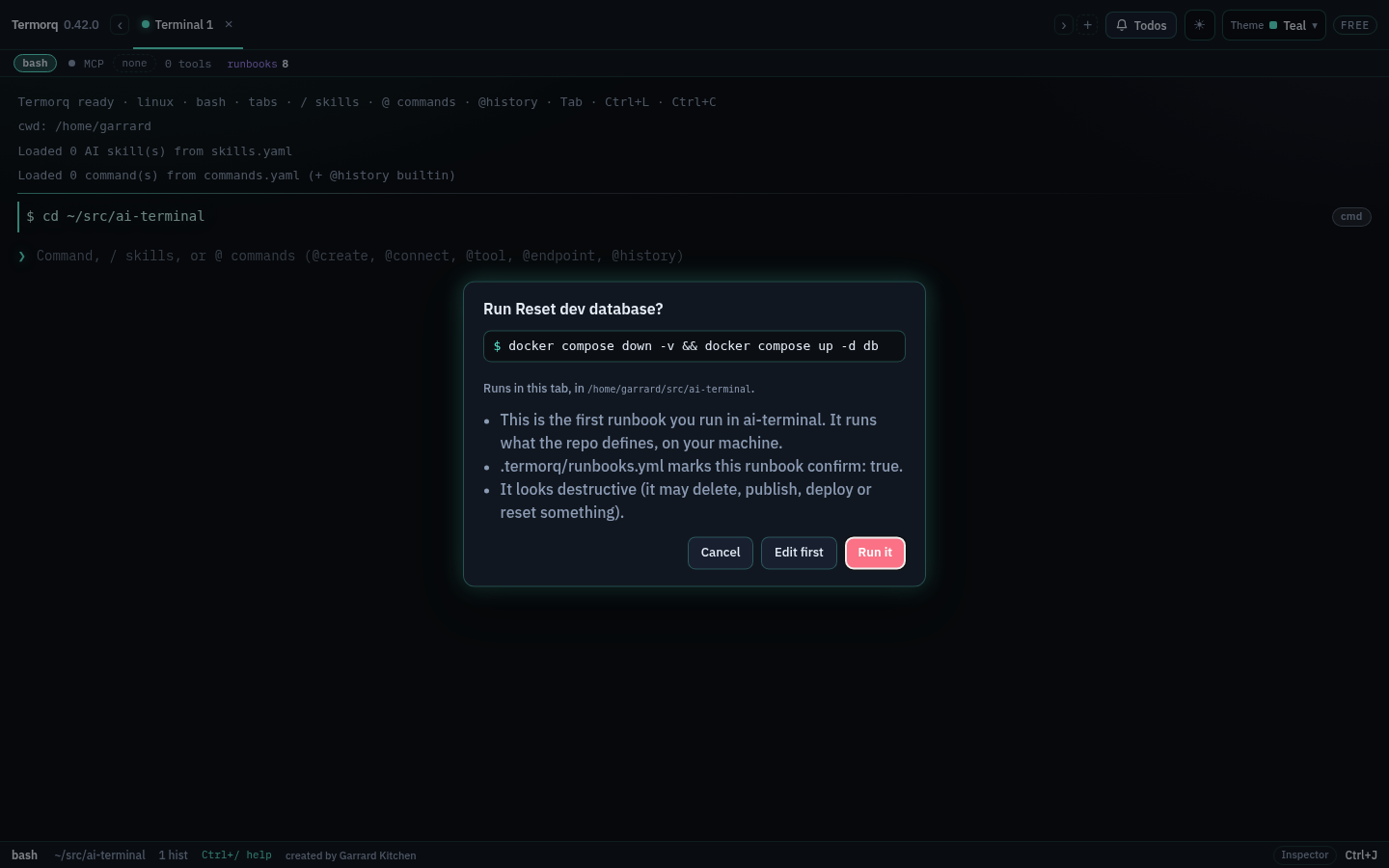
Termorq asks first:
- the first time you run a task in a repository;
- for anything that looks destructive, such as
clean,reset,deploy,publish,rm -rf,git push,docker volume rmorterraform apply; - for anything its file marks
confirm: true(or a just recipe marked[confirm]).
Edit first puts the line in the prompt instead.
The .termorq format
Put runbooks in .termorq/runbooks.yml, .termorq/runbooks.yaml or .termorq/runbooks.toml, or one file per topic in .termorq/runbooks/. Commit them so the whole team gets the same list.
# .termorq/runbooks.yml
runbooks:
  - name: Docs preview
    description: Hugo with drafts
    run: hugo server -D
    cwd: docs/learn
  - name: Release smoke
    description: Build, sign and launch the bundle
    steps:
      - pnpm tauri build
      - ./scripts/smoke.sh
    confirm: true
  - name: Reset local data
    run: ./scripts/reset-local.sh
    destructive: true
# .termorq/runbooks.toml
[[runbooks]]
name = "Seed the database"
description = "Load the sample data"
run = "pnpm db:seed"
confirm = true| Field | Meaning |
|---|---|
name | Required. The card’s title |
run | The command line. Use run or steps, not both |
steps | Several one-line commands, joined with && so it stops at the first failure |
description | Optional second line |
cwd | Optional folder inside the repository to run in |
confirm | true asks before every run |
destructive | true marks it destructive (it always asks) |
A YAML file may also be a bare list of entries. Unknown keys, a missing name or command, a cwd outside the repository, and duplicate names are reported on the source chip, and only that entry is skipped.
Explain a failed command
Pro — Explain a failed command is a Pro feature.
When a command exits non-zero (Ctrl+C does not count), its line gets ✦ Explain. Click it to open the Explain panel under the output. It sends the command, its exit code and the last 40 lines of output to your own AI connection. Termorq masks secrets and tokens before anything is sent, then says how many values it masked. The model is asked for the likely cause and one fix.
For a persistent shell, those lines are the combined terminal text in the order it was received, with that command’s exit status, folder, and shell. The text is not labelled as stderr. Later app output is not included. Put in prompt only fills the prompt.
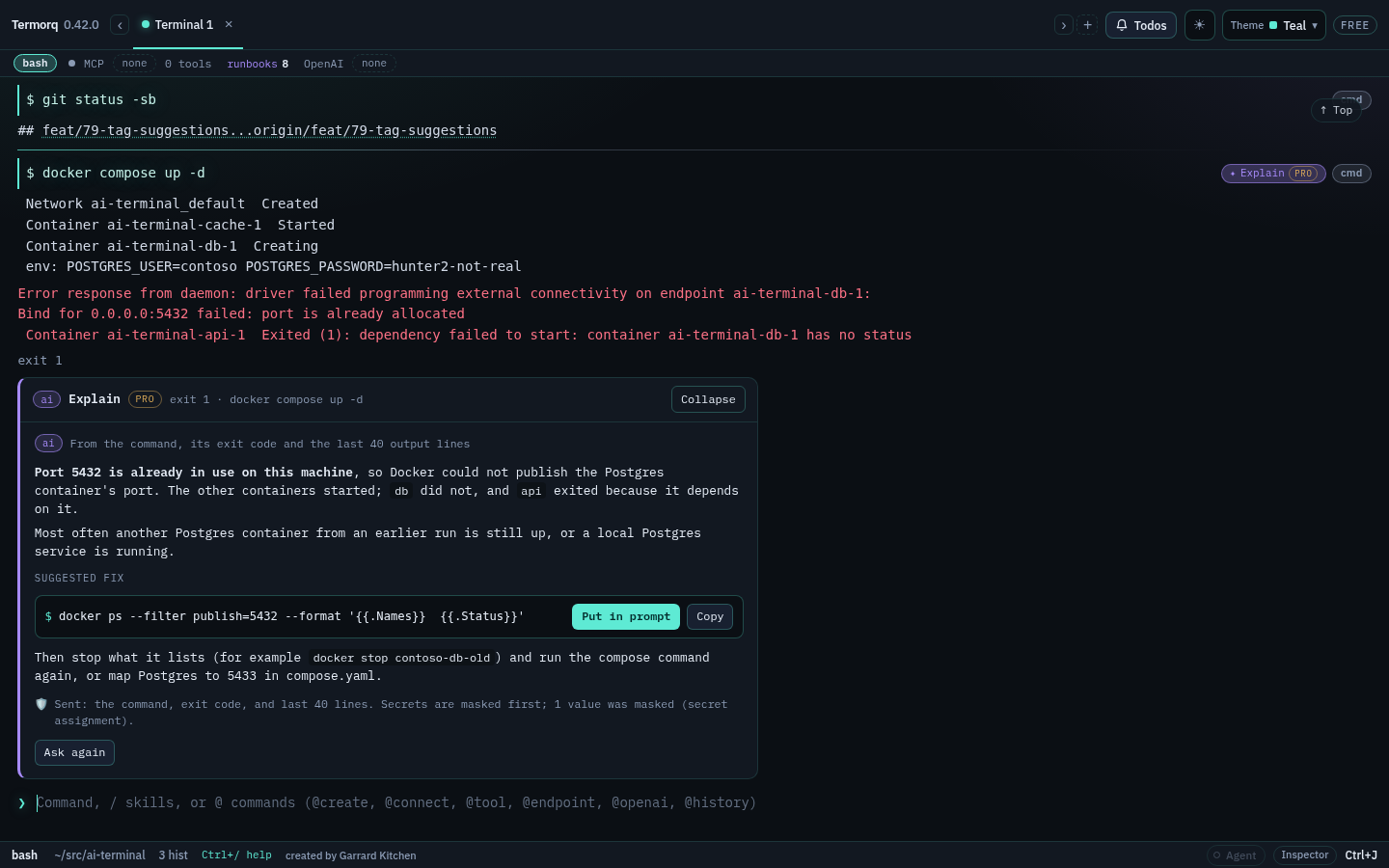
The suggested fix has Put in prompt and Copy. It never runs by itself. Press Enter when you are happy with it.
Explain uses the tab’s AI connection when it has one (from @openai), else asks you to pick one. It is the same panel and masking as Explain failure for CI jobs. In Free, the chip and panel show the Pro badge and what Pro adds, and nothing is sent.