Todos and watchers
Watchers are saved checks on your forge connections. While Termorq is open, each forge is checked in the background on its own schedule, and anything new lands in Todos: review requests, approvals you are required for, pull requests waiting on you, failed or finished pipelines on your branches, and work assigned to you.
- GitHub: notifications, review requests and Actions runs. A private repository is included when the token can read it. See Private repositories.
- GitLab: To-Do items and pipelines. A merge request, and a pipeline on its branch, can show a Datadog pill. See Datadog on GitLab.
- Azure DevOps: pull requests where you are a reviewer or a required approver, and pipeline runs.
Open Todos with the 🔔 Todos button in the title bar (it shows the unread count), Ctrl+Shift+O (Cmd+Shift+O on macOS), Todos in the rail or the Ctrl+J jump list, or @todo at the prompt.
The Todos page
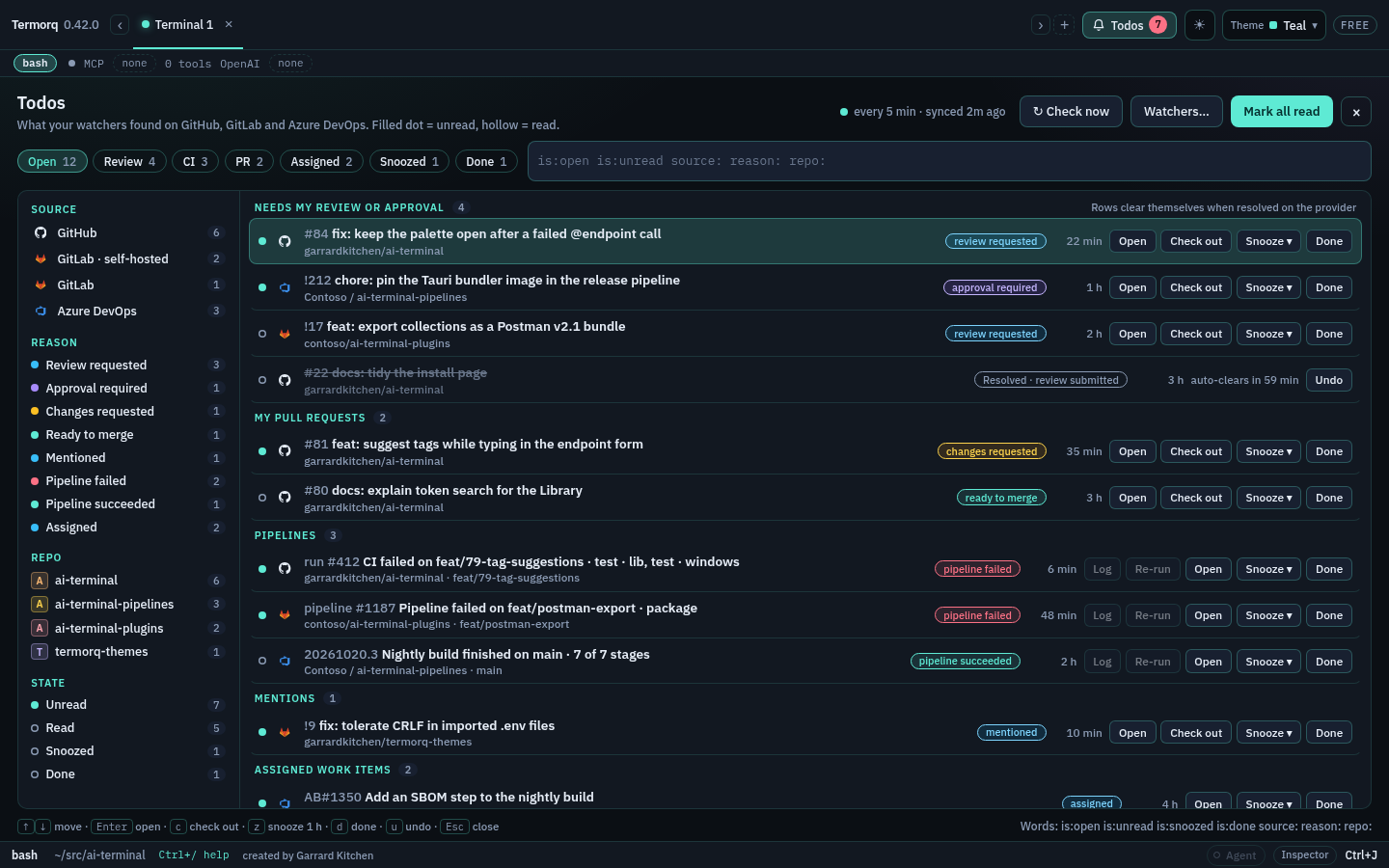
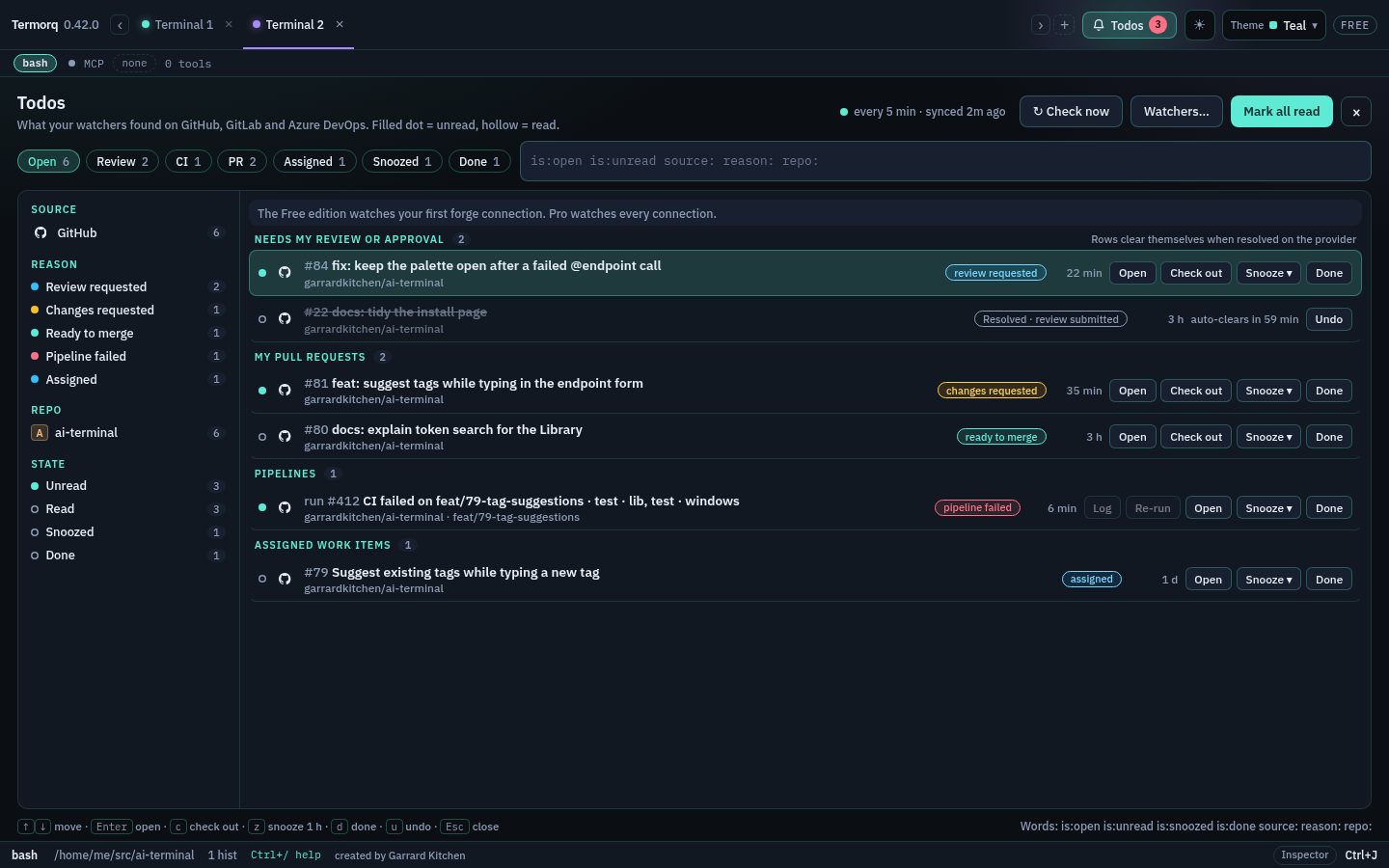
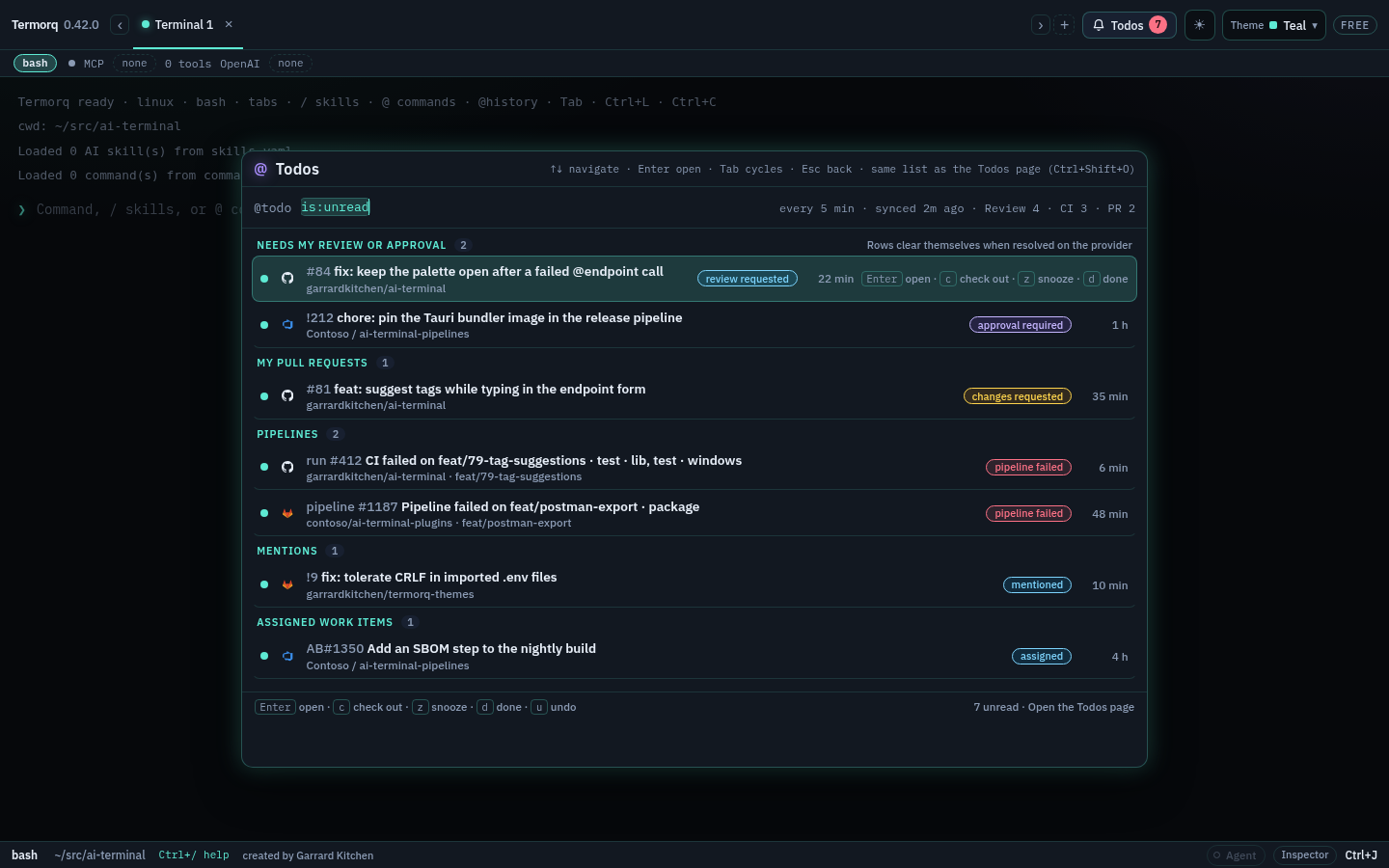
The header shows how often checks run and when the last one finished (every 5 min · synced 2m ago). Check now wakes every forge at once and returns straight away; the line reads checking… until the answers arrive. Watchers… opens the settings below. Mark all read clears the unread dots.
Rows are grouped: Needs my review or approval, My pull requests, Pipelines, Mentions and Assigned work items. A filled dot is unread, a hollow one read. Each todo alerts once, however many checks see it.
- Open opens the item in your browser and marks it read. Enter does the same on the selected row.
- Check out (pull and merge requests) opens the pull request pane with its branch checkout.
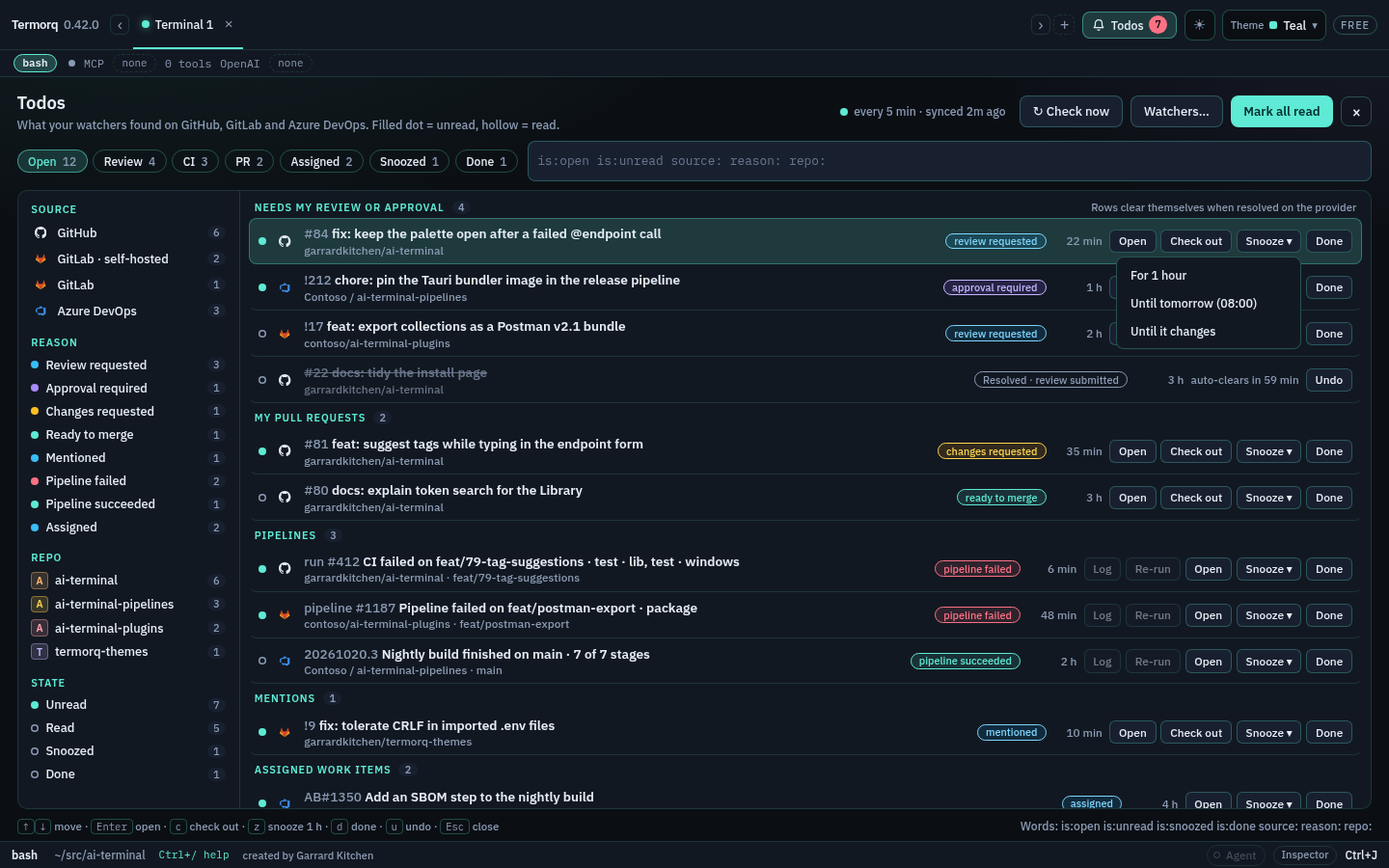
- Snooze ▾ hides the row for 1 hour, until tomorrow (08:00 local time), or until it changes on the provider.
- Done removes the row. Undo brings back a snoozed, done or resolved row.
- Failed pipelines also show Log, which opens the failed job’s log in a new tab, and Re-run, which re-runs the failed jobs after asking (it needs Allow write actions on the connection). See CI status, logs and re-run.
When an item is resolved on the provider (the review was submitted, the pipeline passed, the issue was closed), its row greys out as Resolved · … auto-clears in 1 h with Undo, and then clears itself.
Keys: ↑/↓ move, Enter opens, c checks out, z snoozes for an hour, d marks done, u undoes, Esc closes the page.
Filters
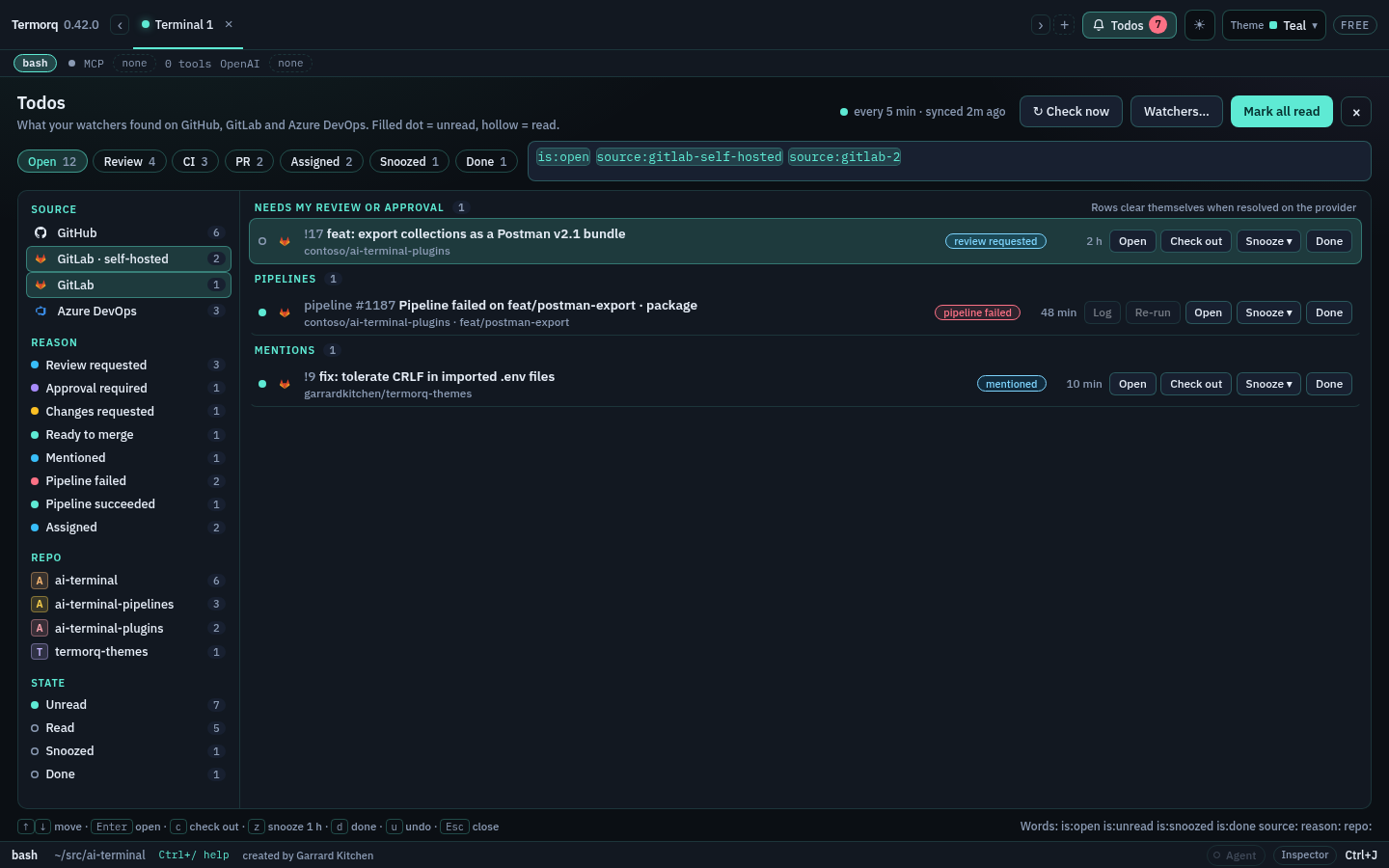
The chips and the facet sidebar write words into the filter box, and you can type them yourself:
| Word | Matches |
|---|---|
is:open | open rows (the default; resolved rows show greyed until they clear) |
is:unread, is:snoozed, is:done | rows in that state |
source:github, source:gitlab, source:ado | rows from that provider; with several connections of one provider, each has its own word (for example source:gitlab-self-hosted) |
reason:review, reason:approval, reason:ci, reason:failed, reason:assigned, reason:mentioned | rows found for that reason |
repo:termorq | rows in that repository |
dd:high, dd:medium, dd:low | GitLab rows whose open Datadog feedback is that level. dd:med is the same as dd:medium |
Repeating a kind matches either value; different kinds must all match. The Source facet lists every connection on its own with its count, never “+1”. Click several to see them together. The Datadog facet is always High, Medium and Low, including when a count is 0.
Closing Todos, or opening it again from the bell, the rail, or Ctrl+Shift+O (Cmd+Shift+O), keeps those filter words and the selected row. Typing @todo with new words uses those words instead.
Datadog on GitLab
GitLab merge requests, and the pipelines on those branches, show a High, Med or Low pill beside the reason while Datadog still has open feedback. Critical counts as High. Info counts as Low. The pill is the worst finding that is still open.
The Datadog facet at the top of the sidebar writes dd:high, dd:medium or dd:low. The same words work in @todo. A comment Datadog has edited to say the merge request is clear leaves no pill. A row with no Datadog comment has no pill. GitHub and Azure DevOps rows are unchanged.
The level does not mark a row unread, and it does not wake a row you snoozed until it changes. A notes check that fails keeps the pill from the last successful check.
@todo
@todo (or todo in the command list) opens the same list over the terminal, with the same filter words, the same selected row, and the same keys. Open the Todos page in its footer switches to the full page.
Settings › Forges › Watchers
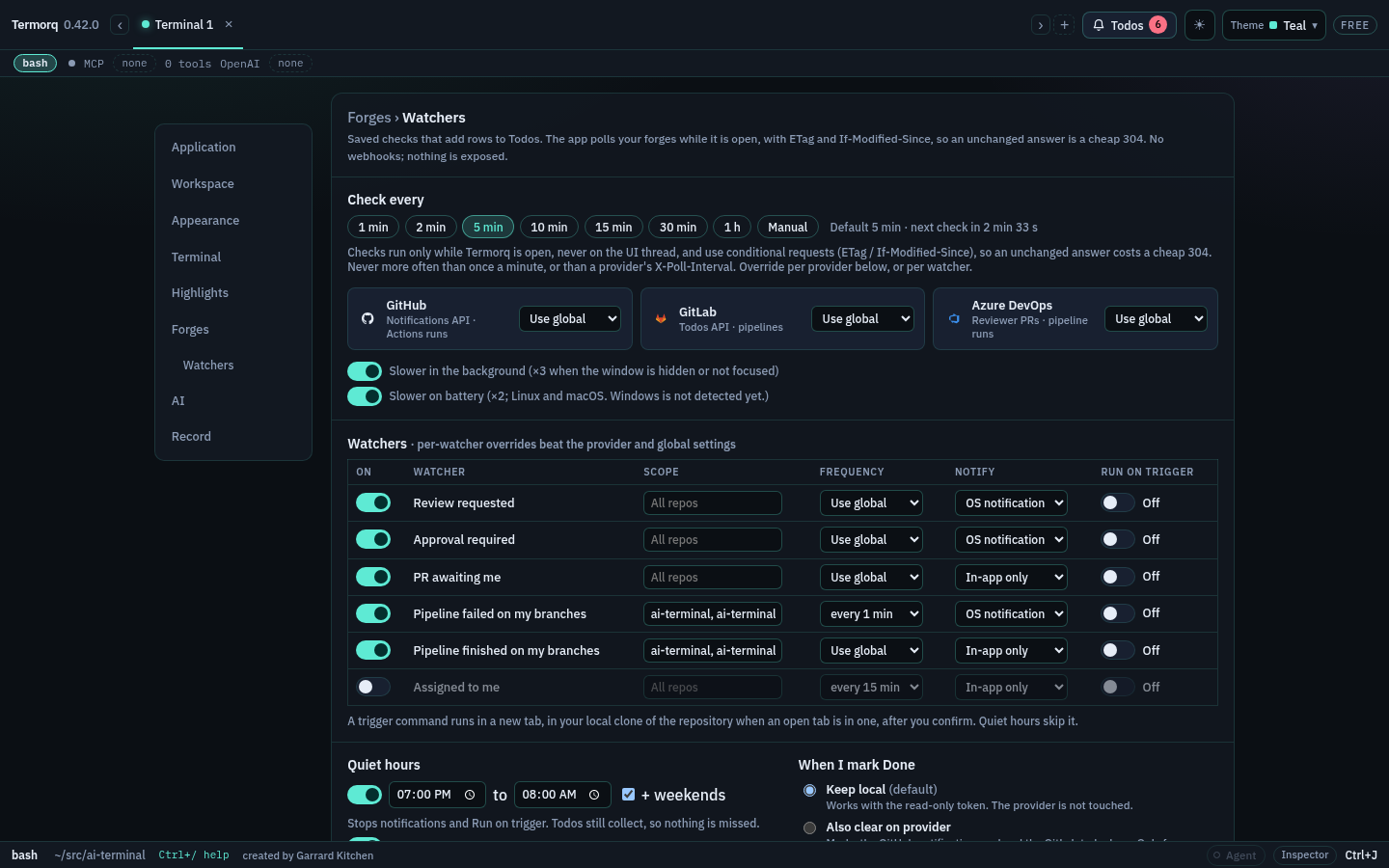
- Check every: 1, 2, 5, 10, 15 or 30 minutes, 1 hour, or Manual (only Check now). The default is 5 minutes.
- Each provider can override that, and each watcher can override its provider. The most specific setting wins. Checks never run more often than once a minute, or than a provider’s
X-Poll-Interval. - Checks use conditional requests (ETag and If-Modified-Since), so an unchanged answer is a cheap 304. A rate limit (429) or server error (5xx) backs off exponentially, with jitter, and a failing forge shows its own error row on the Todos page without holding up the others.
- Slower in the background checks three times less often while the window is hidden or not focused. Slower on battery checks half as often on battery on Linux and macOS. Battery is not detected on Windows yet.
- The watcher table has, for each of Review requested, Approval required, PR awaiting me, Pipeline failed on my branches, Pipeline finished on my branches and Assigned to me: an on/off switch, a Scope (blank for every repository, or repository names separated by commas), a Frequency, and Notify: an OS notification or In-app only.
- Quiet hours (optionally all weekend) stop notifications and Run on trigger. Todos still collect, so nothing is missed.
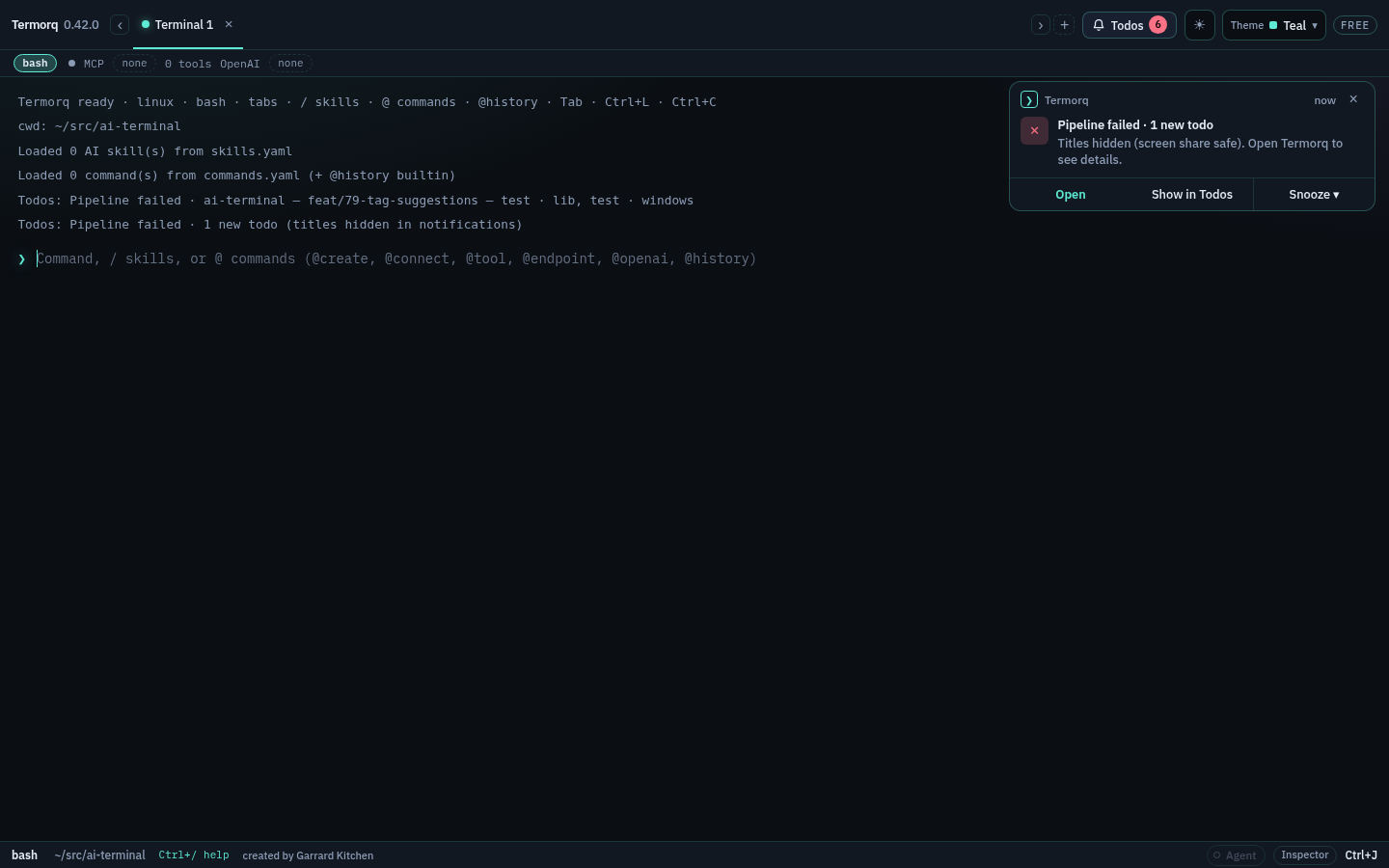
- Hide titles in notifications (screen share safe) makes notifications read only the reason and a count, for example “Pipeline failed · 1 new todo”, with no repository, branch or title.
- When I mark Done: Keep local (the default) works with the read-only token and leaves the provider alone. Also clear on provider marks the GitHub notification read and the GitLab to-do done, but only on connections with Allow write actions on (GitHub needs the
notificationsscope, GitLabapi). Azure DevOps stays local.
Changes save as you make them, and the checks restart with the new settings. Checks only run while Termorq is open; nothing is exposed and no webhooks are used.
Notifications
OS notifications come from the app. Watchers set to In-app only show a card at the top right with Open, Show in Todos and Snooze. Every alert also writes a Todos: line in the terminal.
Run a command on trigger (Pro)
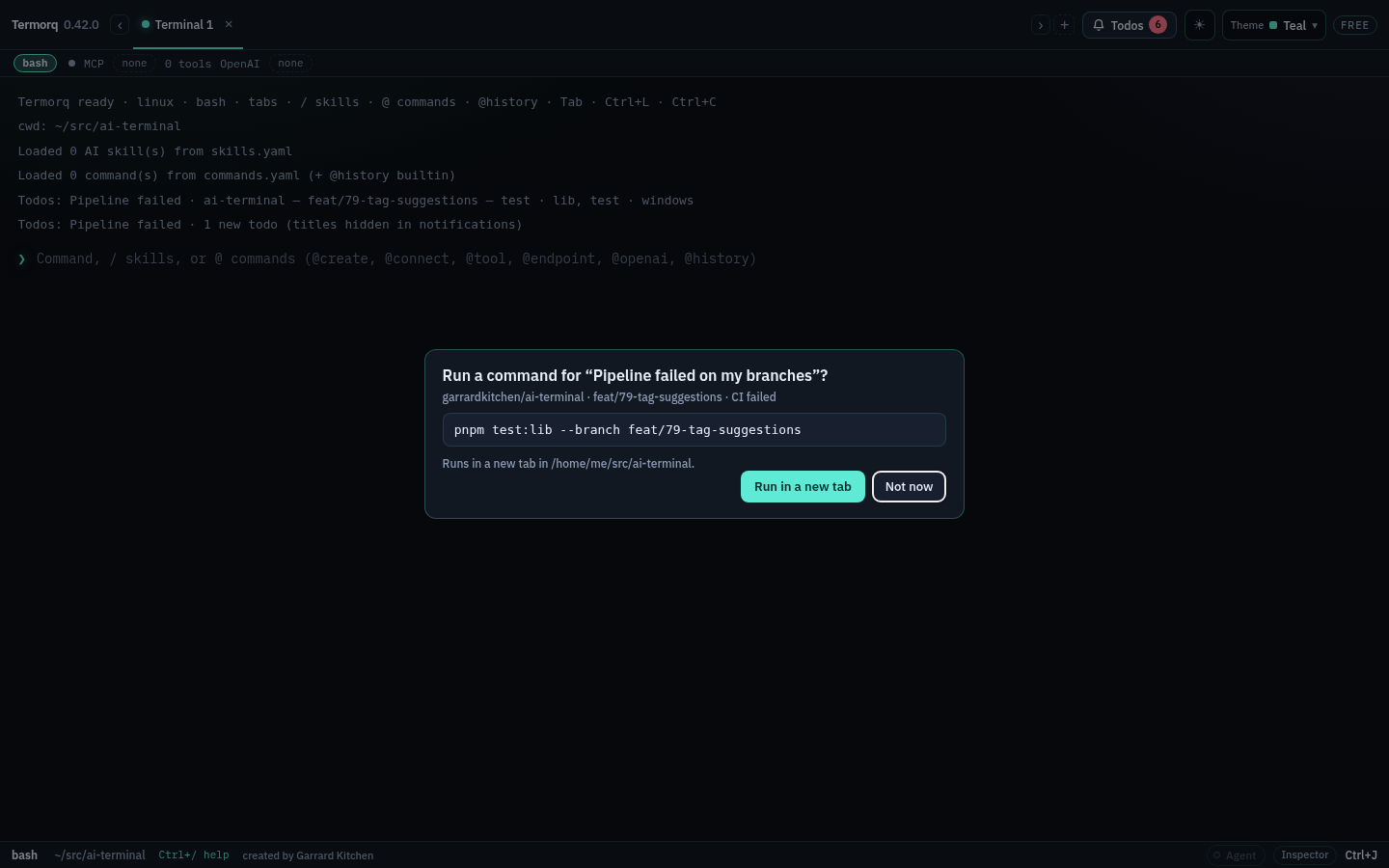
A watcher can run a command when it finds something new, for example pnpm test:lib --branch {branch} when a pipeline fails. It is off by default. {repo}, {branch} and {title} are filled in, shell-quoted.
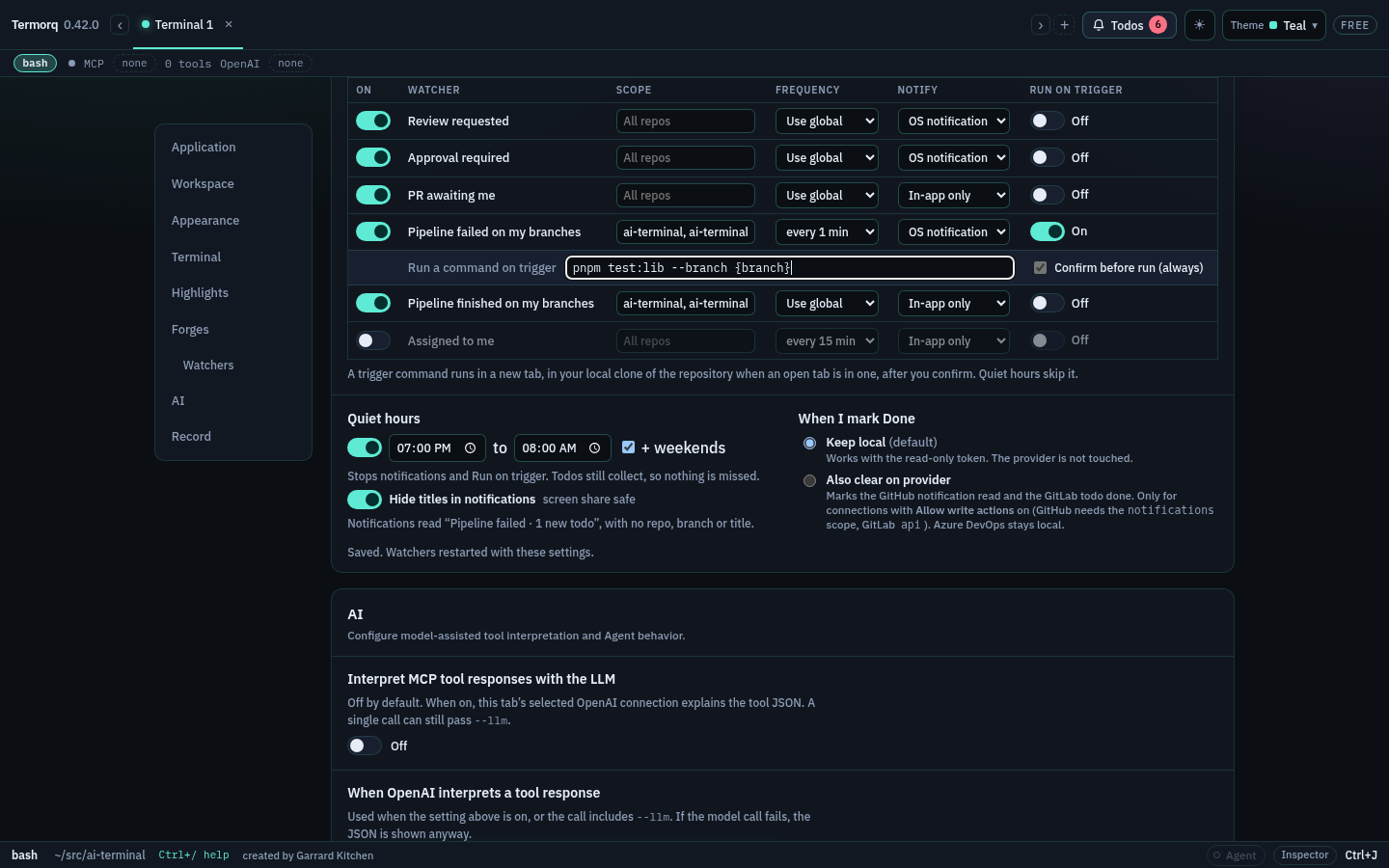
Termorq always asks first. Nothing runs until you choose Run in a new tab. The command then runs in a new tab, in your local clone when an open tab is in a clone of that repository, otherwise in your start folder. Quiet hours skip it.
Editions
Todos and watchers are in the Free edition for your first forge connection. Pro watches every connection and adds Run on trigger.