On this machine
A secret is a value. A name, a {{placeholder}}, and a vault reference are not. The app stores the value in the OS keychain and keeps the name in the file you might commit.
flowchart LR
  field["A secret field"]:::step
  ref{"akv:// or op://?"}:::gate
  vault[("Vault")]:::secret
  chain[("OS keychain")]:::store
  sent["The call"]:::out

  field --> ref
  ref --> vault --> sent
  ref --> chain --> sent

  classDef store fill:#134e4a,stroke:#5eead4,stroke-width:2px,color:#f4fbfa
  classDef secret fill:#FFC131,stroke:#b45309,stroke-width:2px,color:#1a1404
  classDef gate fill:#FFC131,stroke:#b45309,stroke-width:2px,color:#1a1404
  classDef step fill:#0f766e,stroke:#99f6e4,stroke-width:2px,color:#f4fbfa
  classDef out fill:#155e75,stroke:#67e8f9,stroke-width:2px,color:#f4fbfa
  linkStyle 0 stroke:#5eead4,stroke-width:2.5px
  linkStyle 1,2 stroke:#FFC131,stroke-width:2.5px
  linkStyle 3,4 stroke:#67e8f9,stroke-width:2.5px
The keychain
API keys, bearer tokens, basic passwords, client secrets, the OpenAI key, the MCP Azure client secret, and stdio env values whose names look like secrets use the OS keychain. The service name is com.garrardkitchen.ai-terminal.
If the keychain is unavailable, the app falls back to an AES-256-GCM file in the app data folder. That file is not a place to paste a token by hand. A blank secret field on edit keeps the stored value.
Vault references
Anywhere a secret goes, you can type a reference instead:
akv://my-vault/users-api
akv://my-vault/users-api/abcd1234version
op://Private/Users API/credential
@vault test akv://my-vault/users-api
@vault clear
The field shows a vault badge and a Test reference button. The result is resolved, N chars. The value is not shown.
| Reference | How it is fetched |
|---|---|
akv://<vault>/<secret>[/<version>] | az keyvault secret show --vault-name V --name N [--version X] --query value -o tsv, using your existing az login |
op://<vault>/<item>[/<section>]/<field> | op read --no-newline <ref>, or OP_SERVICE_ACCOUNT_TOKEN when you use a service account |
The CLI is started directly. Each argument is separate. There is no shell. Vault, secret, and item names are checked first (Key Vault: letters, digits, and hyphens. 1Password: letters, digits, spaces, -, _, .). A reference cannot inject a command. Each run has a 15-second timeout. Errors are short (az not found, not logged in: run az login, op not signed in, secret not found, access denied).
Resolved values stay in memory for 5 minutes and are added to that call’s scrub list. They are never written to disk, logs, history, or the MCP JSON-RPC log. @vault clear forgets the cache at once.
A reference is saved in the connection file and in a team workspace. The secret guard allows a valid reference and refuses a raw token.
Masking
The mask is ••••••••.
It is applied in the scrollback, in @history, in Markdown export, in the last 10 responses kept for @diff, in @logs (which also drops URLs, headers, and bodies), and in the inspector’s JSON-RPC log. A history line that already contains the mask is inserted into the prompt. It is not run again.
Export to OpenAPI or Postman replaces sensitive fields with {{name}} and writes no secret. .aitapi, .aitmcp, .aitcol bundles that include secrets, and .aitbak are encrypted. The password is not stored.
What does not run unless you ask
| Action | You ask by |
|---|---|
| A shell line | Typing it, or Run on a collection line |
| An interactive program | The program itself, or @shell |
An MCP tool from @agent | Run, Run all, Skip, or Stop on each call |
A destructive tool from termorq-cli | --yes |
Shell lines from termorq-cli | --allow-shell (sh -c, or cmd /C on Windows) |
| A git commit | You, in your own git client. The app has no commit and no push |
OAuth tokens for APIs and for MCP stay in memory. A restart means signing in again. Ctrl+C cancels a sign-in.
The app is a desktop tool. Do not expose it as a network service.
termorq-cli
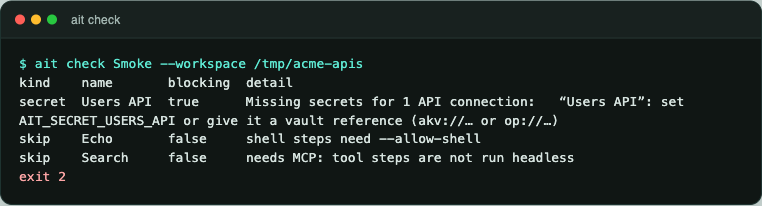
Headless runs use a different order: AIT_SECRET_<NAME>, then the vault reference, then the app secret store. A missing secret exits 2 before any step. The naming rules, the scrub, and the pipeline variables are on Secrets and termorq-cli.
Report a vulnerability
Do not report a suspected vulnerability in a public issue, discussion, or pull request. Use private vulnerability reporting.
If that form is unavailable, contact the maintainer through the contact options on github.com/garrardkitchen. Include a description, the version or commit, how to reproduce it, and the impact. Redact real credentials. Use test values.
You can expect an acknowledgement within seven days. The policy is SECURITY.md in the repository. It covers this source tree and the published artifacts. Reports about a third-party service should also go to that service.