Some commands depend on the edition compiled into the app or termorq-cli. See the Free and Pro feature breakdown ; termorq-cli has no edition switch.
@ opens the commands palette. Type to filter. Entries from commands.yaml follow these built-ins. @history is always available and is not a line in that file.
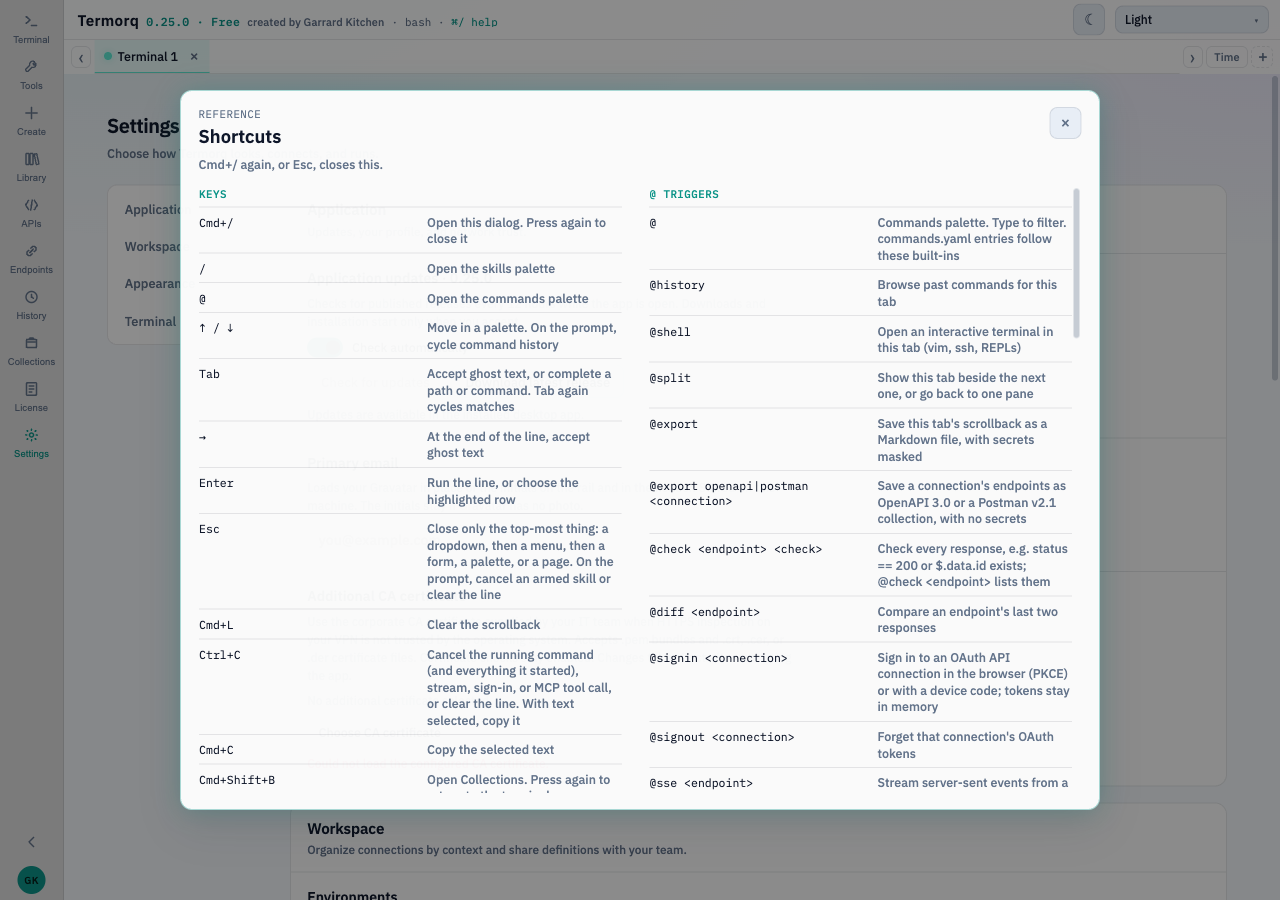
The shortcuts dialog lists the same triggers. The shot is the macOS wording.
Cmd+/ opens Shortcuts. The @ triggers and the call flags are the same list as this page.
Type What it does @Commands palette @historyPast commands for this tab. Insert into the prompt, unless Settings says run immediately @shellInteractive terminal in this tab until exit @splitThis tab beside the next one, or back to one pane @exportThis tab’s scrollback as Markdown, secrets masked @logsNetwork diagnostics beside the terminal. Memory only, no URLs, headers, or bodies @libraryEverything saved @edit nameEditor for a saved server, API, endpoint, OpenAI connection, or collection
Type What it does @createCreate an MCP server, API connection, endpoint, or OpenAI connection @create apiBase URL and auth. Environment and customer come from Settings @create endpointAn endpoint on a saved connection @endpointList. Favourites first, then A→Z @endpoint nameCall, or open the form when a value is missing @endpoint name --param valueCall with that parameter @apisEdit or delete API connections, endpoints, and OpenAI connections @sse <endpoint>Server-sent events. Extra words after the name are ignored. Ctrl+C stops @ws <endpoint> [message]WebSocket. Text after the name sends first; type more messages while it stays open. Ctrl+C closes @signin <connection>OAuth for an API connection. Browser (PKCE) or device code. Tokens stay in memory @signout <connection>Forget that connection’s OAuth tokens @export openapi <connection>OpenAPI 3.0 for that connection’s endpoints. No secrets @export postman <connection>Postman v2.1. No secrets @check <endpoint> <rule>Save a response check, for example status == 200 or $.data.id exists @check <endpoint>List the checks @check <endpoint> clearRemove them @diff <endpoint>Compare the last two responses
Type What it does @create mcpHTTP, Azure client credentials, or stdio @connectConnect this tab. Servers already open on the tab stay connected @toolTools on the connected servers @tool nameArguments form. Looks up a saved server when the tool is not connected yet @tool name --param valueCall immediately. --param=value works too @mcpList, edit, duplicate, delete, export, or import. @servers is the same @mcp signin <server>Browser OAuth for an HTTP server. Ctrl+C cancels @mcp signout <server>Forget that server’s in-memory tokens @mcp inspect <server>Capabilities, tools, resources, prompts, JSON-RPC log, ping @resourcesList and read resources. A template asks for placeholders @promptsList prompts, fill arguments, put the last user message on the input line
Type What it does @create openaiAzure OpenAI, OpenAI, or a local compatible server @openaiSelect a connection for this tab. Hover the pill to disconnect @chat <question>Follow-up, with recent scrollback and token counts. Can call this tab’s tools and saved endpoints; you approve each call @chatShow the running token total @chat clearStart again Agent Prompt toggle, left of ❯. On, a line is chat unless it starts with @. Needs this tab’s OpenAI connection. The system prompt is in Settings # <request>One shell command, placed in the prompt. You run it @explainWhy the last command failed. A fix is placed in the prompt. You run it @agent <goal>The model may call this tab’s tools and saved endpoints. You approve each call /Skills palette. A prompt skill needs the tab’s model. A command skill runs in the shell
Workspace and vault link Type What it does @workspace open <folder>Merge <folder>/.ai-terminal/ by name. The path is absolute or starts with ~ @workspaceStatus @workspace saveWrite definitions without secret values. The guard can refuse @workspace statusGit branch and uncommitted files @workspace closeForget the folder. Merged definitions stay. Nothing is committed @vault test <ref>Resolve akv:// or op://. Shows the length, not the value @vault clearForget cached vault values
Call flags link Flag Where --llmOn a tool call, interpret the JSON with this tab’s model --instruction …Extra instruction. Only with --llm, and it must be last --query key=valueOn an endpoint call, add or replace a query parameter. Repeat it --bodyOn POST, PUT, or PATCH, replace the JSON. Takes the rest of the line --set key=valueChange one body property. --set count:=6 forces a number
termorq-cli link Command What it does termorq-cli listCollections and how many endpoints, commands, and tools each holds termorq-cli show <name>Steps in run order, and why a run would skip one termorq-cli envEnvironments and which variables are still {{name}} termorq-cli apisAPI connections, without secrets termorq-cli endpointsEndpoints. --connection filters termorq-cli mcpMCP servers, without connecting termorq-cli modelsOpenAI connections in the data folder. Rejects --workspace termorq-cli tools <connection>Connect and list that server’s tools. Use --data-dir termorq-cli check <name>Problems only. Exit 0 when nothing blocks, 2 when a row does termorq-cli check --file plan.ymlThe plan, without calling. Connects only to confirm each tool exists termorq-cli call "<line>"One @endpoint or @tool line. Quote it termorq-cli run <name>The collection. Exit 0 pass, 1 failed step, 2 configuration termorq-cli run --file plan.ymlEndpoints and tools. One MCP session per server. Not written back termorq-cli --helpThe same flags as Run a collection termorq-cli --versiontermorq-cli 0.20.0
You cannot pass a collection name and --file together. You cannot pass --workspace and --data-dir together. junit is only for run and call.
Related pages link