Ask the model
Each of these uses the OpenAI connection selected on the current tab. Nothing is sent when that pill says none.
flowchart LR
  you["You"]:::step
  approve{"You approve?"}:::gate
  model["The tab's model"]:::out
  tools[("MCP tools\nand endpoints")]:::store
  prompt["A command\nin the prompt"]:::step

  you --> model
  model --> approve
  approve --> tools
  tools --> model
  model --> prompt

  classDef store fill:#134e4a,stroke:#5eead4,stroke-width:2px,color:#f4fbfa
  classDef gate fill:#FFC131,stroke:#b45309,stroke-width:2px,color:#1a1404
  classDef step fill:#0f766e,stroke:#99f6e4,stroke-width:2px,color:#f4fbfa
  classDef out fill:#155e75,stroke:#67e8f9,stroke-width:2px,color:#f4fbfa
  linkStyle 0,2,3 stroke:#5eead4,stroke-width:2.5px
  linkStyle 1,4 stroke:#FFC131,stroke-width:2.5px
@chat
@chat why did that return an empty list?
@chat
@chat clear
@chat <question> sends the question with the newest scrollback, up to about 8,000 characters, secrets masked. The tab remembers the last 20 turns. After each answer you see the tokens in and out and the chat’s running total. They are marked ≈ when the provider does not report usage. @chat on its own shows the total. @chat clear starts again.
When this tab is connected to MCP servers, or you have saved endpoints, @chat can call them. Each call waits for Run, Run all, Skip, or Stop, the same as @agent. A follow-up still sees the recent scrollback, including what a tool returned.
@chat list 5 users from the connected Entra tenantReplies stream into the scrollback. A server that does not stream still works.
Agent in the prompt
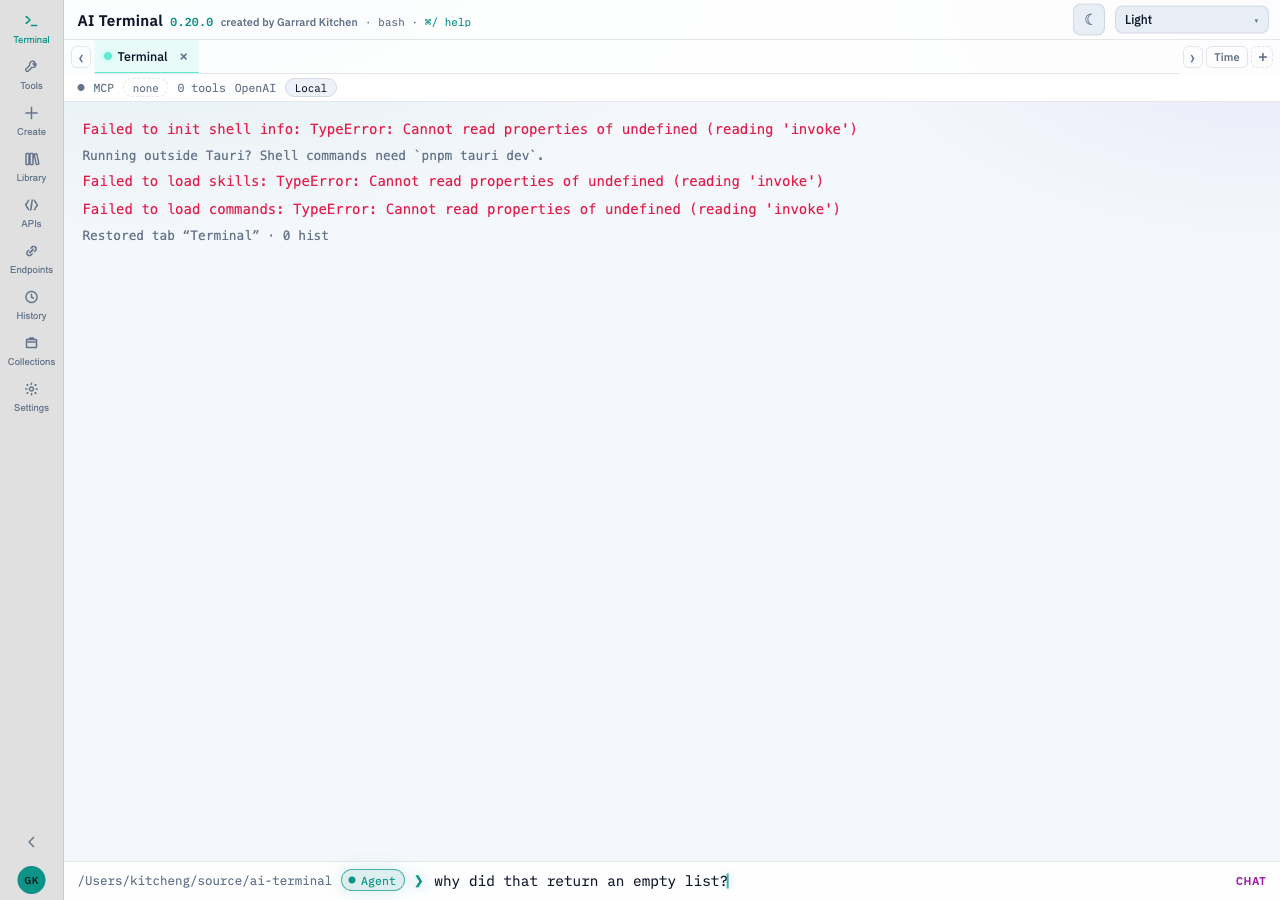
Agent sits in the prompt bar, to the left of ❯. It can be clicked only when this tab has an OpenAI connection. With none selected, the button is dimmed. Hover says to choose one with @openai.
why did that return an empty list?
@chat clear
@tool list users
With Agent on, the first line is the question. It uses the same scrollback, history, and tool approval as @chat. @chat clear still clears this tab’s chat. @tool list users still runs, and Agent stays on for the next line.
A shell command, a / skill, and a # request are questions too, unless the line starts with @. The right of the bar says chat or command, so you can see which will happen before Enter. While Agent is on, typing / does not open the skills palette.
flowchart TD
  typed["A line in the prompt"]:::step
  atsign{"Starts with @?"}:::gate
  command["Runs as a command"]:::out
  chat["Sent as chat"]:::step

  typed --> atsign
  atsign --> command
  atsign --> chat

  classDef store fill:#134e4a,stroke:#5eead4,stroke-width:2px,color:#f4fbfa
  classDef gate fill:#FFC131,stroke:#b45309,stroke-width:2px,color:#1a1404
  classDef step fill:#0f766e,stroke:#99f6e4,stroke-width:2px,color:#f4fbfa
  classDef out fill:#155e75,stroke:#67e8f9,stroke-width:2px,color:#f4fbfa
  classDef exit fill:#9f1239,stroke:#fecdd3,stroke-width:2px,color:#fff1f2
  classDef success fill:#166534,stroke:#86efac,stroke-width:2px,color:#f0fdf4
  linkStyle 0,1 stroke:#FFC131,stroke-width:2.5px
  linkStyle 2 stroke:#5eead4,stroke-width:2.5px
The toggle is per tab and is restored with the tab. Turning the connection off, or deleting it, turns Agent off. A collection step still runs as a command.
Settings → Agent system prompt replaces the built-in chat voice for lines sent this way. The tab’s folder, the recent scrollback, and its tools are still included. Leave the field blank to keep the built-in instructions. The system prompt on an OpenAI connection is separate. It is sent only when a tool result is interpreted.
@explain
When a command exits non-zero in a tab with a connection:
@explainThe model receives the command, the folder, the shell, the exit code, and the end of the error output, with secrets masked. The explanation streams in. Any corrected command is placed in the prompt for you to check. It is not run for you.
A line that starts with
# find files over 100 MB hereThe model writes one command for your shell, OS, and folder, and places it in the prompt with a short note. You press Enter. History is the same feature from the terminal side.
Skills
/explain how to make tea runs the Explain skill. A prompt skill is marked skill. A command skill runs in the shell and is marked script. The skill file is The prompt.
@agent
@agent list the users and tell me the method@agent <goal> sends the goal with the tab’s connected MCP tools and your saved endpoints. Each call the model wants to make waits above the prompt:
| Control | Action |
|---|---|
| Run (Enter) | Run this call |
| Run all | Run the rest of the calls for this goal |
| Skip (Esc) | Skip this call |
| Stop | End the goal |
Results go back to the model. Secret-looking arguments are masked. A goal stops after eight rounds. Ctrl+C stops it at any time.
An MCP tool the model calls sits on the right of the scrollback. The card reads OpenAI → MCP and names the tool. It pulses while the tool runs. Click the card to see the parameters that were sent. The JSON response starts closed. Click JSON response to open it. Search and copy work on the open response. A failed call shows failed, and its message opens from Error.
Run all approves the remaining calls in that goal. Read the tool name before you press it. A destructive tool is still a tool call on your machine.
termorq-cli does not run @agent. A collection line that is a model step is counted and then skipped.