Calling an endpoint
@create endpoint asks for the connection, the name, the method, and the path. Methods are GET, POST, PUT, PATCH, DELETE, HEAD, and OPTIONS. You can add query defaults, path parameters, and extra headers.
A {name} in the path becomes a path parameter with an optional default. Call it with --name value.
@create endpointNames may contain spaces. POST, PUT, and PATCH can include a JSON body, sent as application/json. A blank body sends none. The test shows the status as a coloured pill. Save stays disabled until an HTTP response comes back.
{{variable}} anywhere in the path, query, headers, or body is filled from Settings → Environments for the connection’s environment. An unknown variable stops the call. These variables are not secrets. A secret belongs on the connection or in a vault reference.
List and call
@endpoint lists saved endpoints with favourites first, then A→Z. The star on a row marks or clears a favourite. Endpoint rows in @apis use the same star and the same order.
@endpoint
@endpoint List users
@endpoint Get user --id 1
@endpoint List users --query status=active --query limit=20
@endpoint name calls immediately when there is nothing to fill in, or opens the query form. Flags come after the name. An unknown flag does not call.
| Flag | Effect |
|---|---|
--id 1 | Sets the path or query parameter of that name |
--query key=value | Adds a query parameter for this call, including a key that is not saved. Repeat it. The value is a string. A same-named flag such as --filter wins over --query filter=. A key already in the path’s query string is replaced |
--body {"name":"Ada"} | On POST, PUT, or PATCH, replaces the saved JSON for this call. It takes the rest of the line |
--set key=value | Changes one property of the saved body, and adds the key if it is missing. The match ignores case, so totp replaces Totp. Repeat it. The split is the first =. true, false, and null are JSON. Everything else is a string. --set count:=6 forces a JSON number. Quote a value that contains a space |
--set then --body | --body replaces the payload, then --set is applied. Put --set before --body on the line |
A value that looks like a secret is masked in @history.
The scrollback marks the call with an endpoint pill and shows how long it took. The body is a JSON block. The magnifying glass on it searches that response. Search a response has the keys.
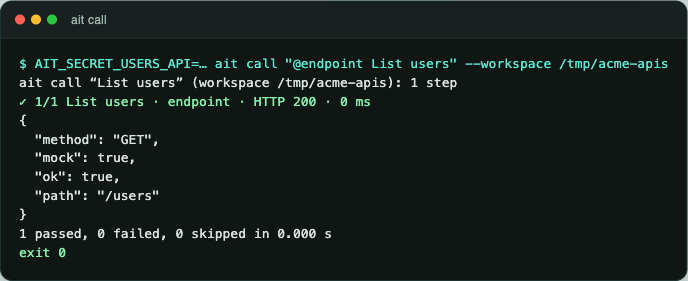
termorq-cli call "@endpoint List users" --workspace ~/src/acme-apisGraphQL and streams
Tick GraphQL on the endpoint when the body is a query. @sse and @ws stream a saved endpoint. Both are on GraphQL and streams.