Secrets and termorq-cli
termorq-cli will not start a run that needs a secret it cannot find, and it scrubs every secret it does find from the text, JSON, YAML, and JUnit it writes. This page is the CLI. The app’s keychain, export files, and workspace guard get their own chapter later.
Where the secret comes from
For each connection a step will call, termorq-cli looks in this order:
- The environment variable
AIT_SECRET_<CONNECTION_NAME>. - The connection’s vault reference,
akv://…orop://…. - The app’s secret store, when that store can be reached on this machine.
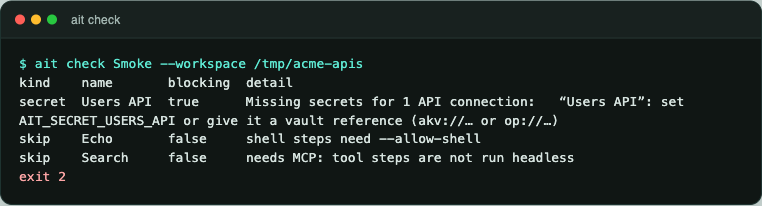
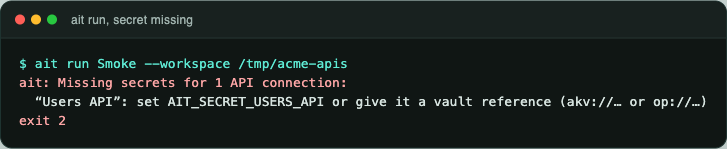
The variable name is the connection name in upper case, with every other character written as _. Users API becomes AIT_SECRET_USERS_API. gh-prod.v2 becomes AIT_SECRET_GH_PROD_V2.
A workspace variable left as {{REGION}} is read from AIT_VAR_REGION. A value passed with --var REGION=eu wins over both the environment and AIT_VAR_REGION.
If a required secret is missing, nothing runs. The message names the variable and the exit code is 2.
Put the value in the pipeline’s secret store, not in the plan file and not in .ai-terminal/. A reference (akv://, op://, or {{name}}) is safe to commit. The value is not.
Vault references
akv://<vault>/<secret>[/<version>] is read with az keyvault secret show. You need az login on that machine.
op://<vault>/<item>[/<section>]/<field> is read with op read. You need a signed-in op, or OP_SERVICE_ACCOUNT_TOKEN.
The name is checked before the command runs (letters, digits, and a short list of punctuation), each argument is passed on its own, and there is no shell in between. A reference cannot become a second command. The resolved value stays in memory for that run and is added to the scrub list.
What is scrubbed
Any secret termorq-cli loaded is replaced in the output. The sample runs on this site used a throwaway token. It does not appear in the text report, the JSON report, or these screenshots. The prompt lines show AIT_SECRET_USERS_API=… on purpose.
Response bodies are still written. If an API returns customer data, that data is in the JUnit file. Treat the report as sensitive even though the credential is gone.
What does not run unless you ask
| Step | Default in a collection run | How to run it |
|---|---|---|
| Saved endpoint | Runs | — |
| Shell line | Skipped | --allow-shell runs it with sh -c (cmd /C on Windows) |
| MCP tool | Skipped | Put it in a plan file, or use termorq-cli call. A destructive tool also needs --yes |
@agent, @chat, /skill | Skipped | Not run headless |
@sse, @ws | Skipped | Not run headless |
| Browser or device-code OAuth | Refused | Sign in needs a person |
--allow-shell is off because a shared collection can contain any shell line. Turn it on only for a collection you have read. --yes is the same idea for a tool the server marked destructive: termorq-cli check warns, termorq-cli run refuses, and the flag is how you say you meant it.
A collection check does not open MCP. termorq-cli check --file connects far enough to see that each named tool exists.
Report a vulnerability
Do not file a suspected vulnerability as a public issue. Use private vulnerability reporting for this repository. The policy in SECURITY.md asks for a description, the version, and steps, with real credentials removed. You should get an acknowledgement within seven days.