Run a collection
Running collections as runbooks is a Pro feature. Free builds can still list collections with termorq-cli list and inspect them with termorq-cli show. The available commands follow the edition compiled into termorq-cli; the CLI has no edition flag or runtime switch.
termorq-cli runs a saved collection without opening Termorq. It uses the same HTTP calls, variables, response checks, and captures as the app. Version 0.20.0 prints termorq-cli 0.20.0.
The screenshots on this page are the real binary, taken against a sample workspace at /tmp/acme-apis. That workspace points Users API at mock://users, the app’s offline demo host, so nothing left the machine. A secret named in the prompt is shown as …. The value never appears in the output.
What a run does
flowchart LR
  workspace[("Workspace\n.ai-terminal/")]:::store
  check{"Secrets and\nvariables"}:::gate
  steps["Favourites,\nthen the rest"]:::step
  report["Text, JSON,\nYAML, or JUnit"]:::out
  code(["Exit 0, 1, or 2"]):::exit

  workspace --> check --> steps --> report --> code

  classDef store fill:#134e4a,stroke:#5eead4,stroke-width:2px,color:#f4fbfa
  classDef gate fill:#FFC131,stroke:#b45309,stroke-width:2px,color:#1a1404
  classDef step fill:#0f766e,stroke:#99f6e4,stroke-width:2px,color:#f4fbfa
  classDef out fill:#155e75,stroke:#67e8f9,stroke-width:2px,color:#f4fbfa
  classDef exit fill:#9f1239,stroke:#fecdd3,stroke-width:2px,color:#fff1f2
  linkStyle 0,1,2 stroke:#5eead4,stroke-width:2.5px
  linkStyle 3 stroke:#fb7185,stroke-width:2.5px
Favourites run first, then the other lines, in order. A capture such as method = $.method is available to later lines as {{method}}.
A collection run skips MCP tool steps, model lines (@agent, @chat, /skill), app commands, and @sse / @ws streams. A plan file can call tools. OAuth that needs a browser or a device code cannot run headless.
Build the binary
From a checkout of the repo:
cargo build --release --bin termorq-cli --manifest-path src-tauri/Cargo.tomlThe binary is src-tauri/target/release/termorq-cli. Building it compiles the app library, so Linux needs the same packages as the app. The binary itself does not open a window.
Point it at a workspace
termorq-cli list --workspace ~/src/acme-apis--workspace reads <path>/.ai-terminal/. The path must be absolute, or start with ~. A relative . is rejected with Use an absolute path (or one starting with ~).
--data-dir reads the app’s own data folder instead. Response checks and environments live with the workspace or in the app’s settings, which the CLI cannot read, so use --workspace when you need checks. OpenAI connections are only in the data folder: termorq-cli models tells you to pass --data-dir.
Save the folder from the app first with @workspace save, or start from a checkout that already has .ai-terminal/.
List the collections
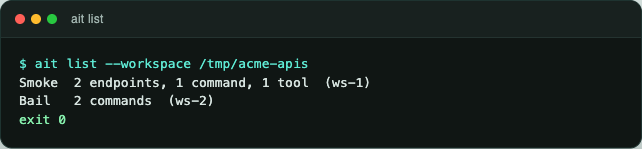
csv, tsv, json, and yaml print the same counts. junit is only for run and call.
Show one collection
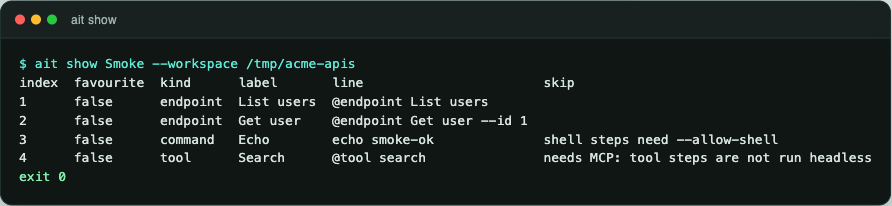
The skip column is a preview. It does not call anything.
Look around
These read the workspace and print no secrets.
$ termorq-cli env --workspace /tmp/acme-apis
environment  name    value       placeholder
Staging      region  eu
Prod         region  {{REGION}}  REGION

$ termorq-cli apis --workspace /tmp/acme-apis
name       id                    base_url      auth    has_secret  secret_ref  environment  endpoints
Users API  api-18dd12b05e640638  mock://users  bearer  false                   Staging      2

$ termorq-cli endpoints --workspace /tmp/acme-apis --connection "Users API"
name        id                   connection  method  path         graphql  favourite  checks
Get user    ep-18dd12b05f77c410  Users API   GET     /users/{id}  false    false      1
List users  ep-18dd12b05f77b858  Users API   GET     /users       false    false      2

$ termorq-cli mcp --workspace /tmp/acme-apis
name  id  transport  target                         has_secret  auto_connect
Docs      http       https://docs.example.test/mcp  false       false
The id values are generated when the workspace is read. A later run prints different ids. has_secret is false here because the bearer token is supplied with AIT_SECRET_USERS_API, not stored in the file. The MCP id column is empty until the server is saved with one.
termorq-cli endpoints --connection filters to one API. termorq-cli mcp lists saved servers and does not connect. termorq-cli tools Docs --data-dir <app-data> does connect, and --name filters the tool list. termorq-cli models --data-dir <app-data> lists saved OpenAI and Azure OpenAI connections.
Check, then run
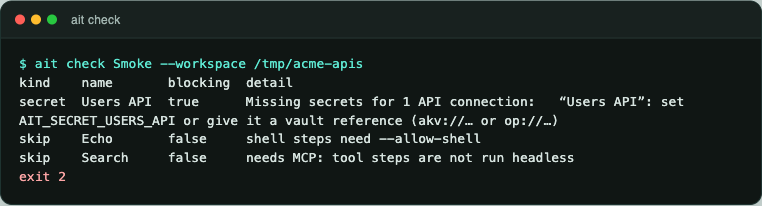
termorq-cli check prints problems and does not call. A missing secret or an unknown endpoint is blocking and the exit code is 2. A skip is a warning. A destructive tool without --yes is a warning here, and termorq-cli run still refuses it.
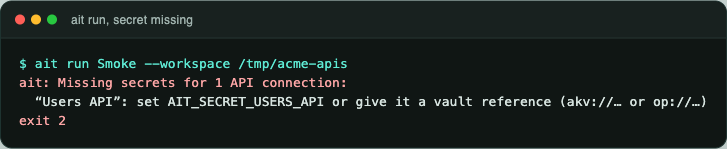
termorq-cli run stops before the first step when the secret is missing:
Set the secret, name the environment, and allow the shell step:
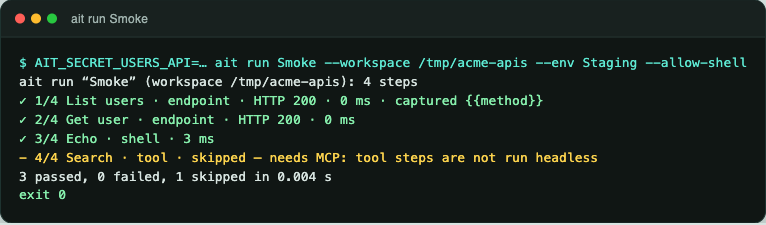
Exit code 0. The skipped tool is allowed. Without --allow-shell the echo line is skipped as well, and the run still exits 0 when every endpoint passed:
✓ 1/4 List users · endpoint · HTTP 200 · 0 ms · captured {{method}}
✓ 2/4 Get user · endpoint · HTTP 200 · 0 ms
- 3/4 Echo · shell · skipped — shell steps need --allow-shell
- 4/4 Search · tool · skipped — needs MCP: tool steps are not run headless
2 passed, 0 failed, 2 skipped
--bail stops at the first failure and reports the rest as skipped. This collection’s first line exits 3:
$ termorq-cli run Bail --workspace /tmp/acme-apis --allow-shell --bail
✗ 1/2 Fails · shell · 3 ms — it exited with code 3
    first
- 2/2 After · shell · skipped — not run: an earlier step failed (--bail)
0 passed, 1 failed, 1 skipped
exit 1
--timeout is per step, in seconds. The default is 30. --env Staging loads that environment’s variables. Repeat --var key=value to override one name. --var wins over --env.
One line
Quote the line so its flags are not read as termorq-cli options.
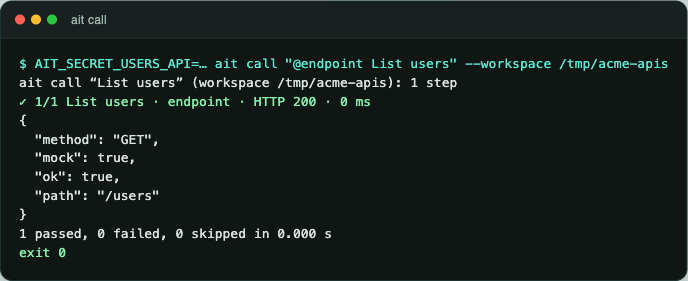
termorq-cli call "@endpoint List users" --workspace ~/src/acme-apisA tool uses the same command with the app’s data folder. On macOS that folder is ~/Library/Application Support/com.garrardkitchen.ai-terminal. On Linux it is ~/.local/share/com.garrardkitchen.ai-terminal.
termorq-cli call "@tool echo --message hi" --data-dir ~/Library/Application\ Support/com.garrardkitchen.ai-terminal --connection Docs --yes--connection is required for a tool when more than one MCP server is saved. --yes is required when the tool is marked destructive. A collection run skips tool lines. JSON and YAML include the response. The secret is not printed.
When a check fails
The endpoint Expect missing expects HTTP 404. The mock host answered 200, so the step fails and the exit code is 1.
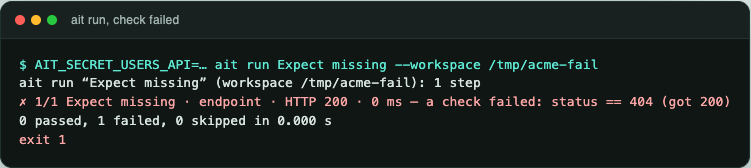
Checks use the same language as the app: status == 200, status < 400, $.mock == true, $.name == "Ada", $.tags contains "x", $.items.length > 0, $.path contains GET.
Run a plan file
termorq-cli run --file plan.yml runs the steps in the file. The file is not saved as a collection. On a run, --env, --var, --bail, --timeout, and --yes win over the file.
schema: 1
env: Staging
timeout: 30
steps:
  - endpoint: List users
    capture: method = $.method
  - endpoint: Get user
  - line: echo smoke-ok
Against the sample workspace, with the secret set and --allow-shell, that file passed all three steps and printed each JSON body. A tool step looks like this:
  - tool: search
    connection: Docs
    args:
      query: users
The plan is checked before any step runs. An unknown endpoint, a missing secret, a missing server, or a destructive tool without --yes stops it. One MCP session is opened per server. termorq-cli check --file plan.yml connects only to confirm each tool exists.
You cannot pass a collection name and --file together.
Output and exit codes
--format | Where it works | What you get |
|---|---|---|
text | every command | The tables and the step list above. This is the default. |
csv, tsv | list, show, env, apis, endpoints, mcp, models, tools, and a run | A flat table. A run is one row per step. |
json, yaml | the same commands | yml is accepted for yaml. A run report has collection, source, ok, passed, failed, skipped, duration_ms, and steps. |
junit | run and call only | A JUnit document on standard output. |
Warnings, such as a skipped tool, go to standard error. The JUnit or JSON document on standard output stays valid. Redirect stdout only:
termorq-cli run Smoke --workspace ~/src/acme-apis --format junit > termorq-cli-results.xml| Exit code | Meaning |
|---|---|
| 0 | Every step that ran passed. Skips are allowed. termorq-cli check exits 0 when nothing is blocking. |
| 1 | A step failed. |
| 2 | Usage or configuration. Unknown command, missing secret, unknown collection, bad flag, empty collection. |
termorq-cli --help prints the full usage. termorq-cli --version prints termorq-cli and the app version.