User guide
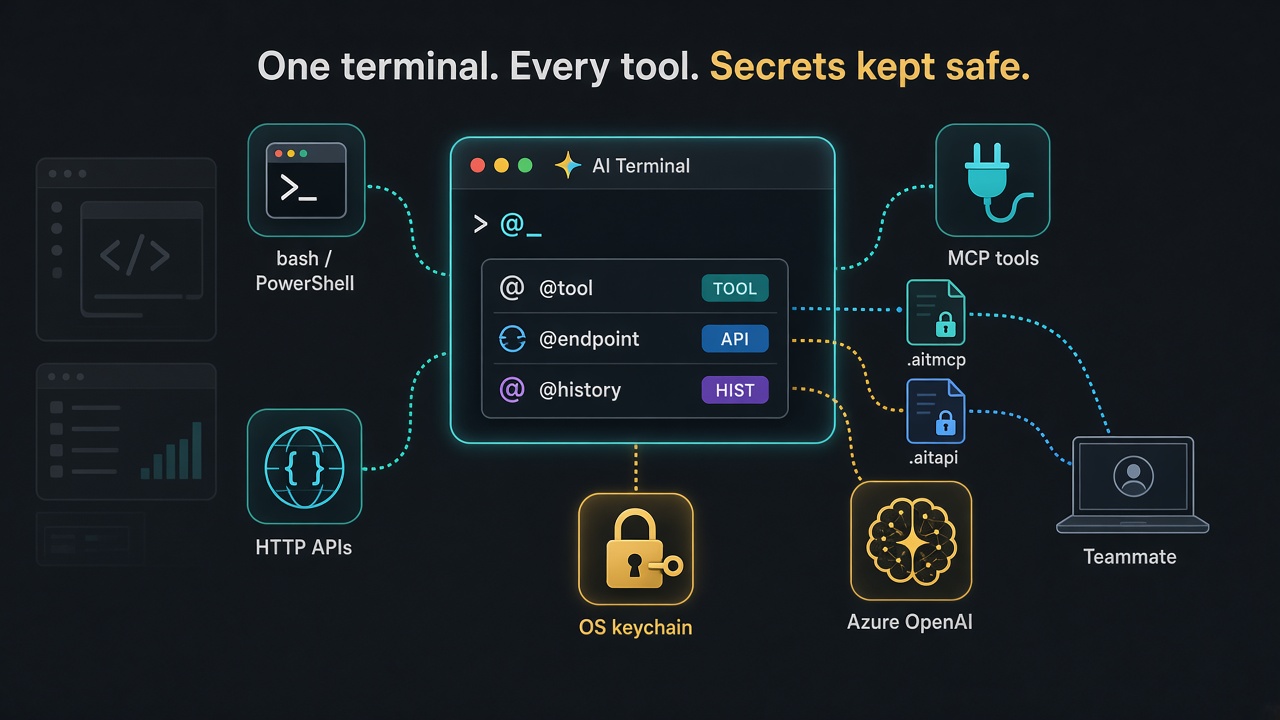
One terminal for the shell, your APIs, and MCP Servers.
Termorq keeps the call, the secret, and the check together. Pro includes termorq-cli to run that same collection in a pipeline.


Killer Free features
These are in Free, and Pro includes them too.
- 1
Call MCP tools and saved endpoints from the prompt
Type
@tool · @endpoint@tool search --query teaor@endpoint Get user --id 1. Ghost text completes endpoint names, and tool names on a connected server, then their parameter flags. A tool that is not connected yet is found on your saved servers and connected for you. The tool form recalls your last 10 argument sets, leaving out anything that looks like a secret. - 2
Import an OpenAPI schema
Turn an OpenAPI 3 or Swagger 2 file, JSON or YAML, into an API connection and its endpoints. Postman, Insomnia, and a pasted
Import and exportcurlwork too. Pick the endpoints to keep; credentials are never imported. - 3
Share your setup with colleagues
Export API connections and endpoints (
Share a file · OpenAPI and Postman export.aitapi), MCP servers (.aitmcp), and collections (.aitcol) as password-encrypted files a colleague imports, with a preview before anything is replaced. Or export endpoints as OpenAPI or Postman with secrets replaced by placeholders. - 4
Highlight and alert rules New
Colour output that matches saved text or a regex, and send a desktop notification on a match. Mask in notifications is on by default, so an alert names the rule and tab but never shows the matched line. Free applies three rules; Pro keeps up to 50.
Highlights and alerts - 5
Drop-down window New
A global shortcut slides Termorq down from the top of the screen in any app. Press it again to hide it.
Drop-down window - 6
Report an AI issue New
Flag an AI response, or type
Report an AI issue@report. The report opens in your email app and a copy is saved. Your API key is never included. - 7
Inline images New
See iTerm2 and Sixel images, such as
Inline imageschafaorimgcatoutput, in the scrollback, and images in API and MCP results. Drop an image file on a tab to show it there.
Killer Pro features
Pro adds these to everything in Free. See the Free and Pro comparison.
- 1
Markdown runbooks New
Open a
Markdown runbooks.mdfile with@md, or drop it on the window. Run its shell, PowerShell, Python, JavaScript, TypeScript, or C# blocks one at a time or with Run all. Output streams in under each block. - 2
SSH connections, and typing into every SSH tab at once New
Save SSH hosts or import them from
SSH connections · Sessions and files · Type into all SSH tabs~/.ssh/config, then open each in a tab. Browse and copy remote files over SFTP and forward local ports. Ctrl+Alt+Shift+B sends what you type to every open SSH tab, so one command reaches every server. - 3
Record and replay a tab session New
Record a tab as an asciinema
Recording and replay.castfile with secrets masked. Replay it in the app, export it, or start and stop a recording from the tray. - 4
AI Agent on your own OpenAI-compatible model
Connect Azure OpenAI, OpenAI, or a compatible server such as Ollama or LM Studio. Agent can call your MCP tools and saved APIs; you approve each call.
Model connections · Agent in the prompt - 5
A team workspace you can review
Share API, MCP, endpoint, and collection definitions with your team through a git folder.
Team workspace@workspace savewrites pretty JSON under.ai-terminal/without secrets. You commit the diff yourself. - 6
Web Check from the tray
Schedule checks for saved APIs and MCP tools and read their history. Start or stop it and open its output from the Windows notification area, macOS menu bar, or Dock.
Explore Web Check
What you can do
Shell, tabs, and a real terminal
Bash, zsh, PowerShell, and WSL in tabs and split panes, with an interactive PTY when a program needs a keyboard. Pin, reorder, and maximise tabs, and type into both split panes at once with Ctrl+Alt+B (Cmd+Option+B on macOS).
Read itHTTP APIs with checks
Save a base URL and its auth once and reuse it for many endpoints: API key, bearer, basic, or OAuth, with an optional client certificate for mutual TLS.
Read itGraphQL and live API streams
Send GraphQL requests, follow server-sent events, and exchange messages over WebSockets in the terminal.
Read itMCP tools
Connect HTTP, Azure, or stdio servers, and sign in to HTTP servers with OAuth. Inspect tools, resources, and prompts before you call them.
Read itCollections
Save and organise reusable command lines. Pro runs them as a runbook: a capture such as method = $.method feeds the next line as {{method}}.
Secrets and encrypted backups
Secret values stay in the OS keychain or a vault reference, never in the saved JSON. A full .aitbak backup of everything is always encrypted.
Notifications and clickable output
A desktop notification when a long command finishes out of view. Ctrl or Cmd+click URLs and file paths in output to open or reveal them.
Notifications · Links in outputGitHub, GitLab, Azure DevOps
The same run writes JUnit. Secrets come from the pipeline, not from the repo.
Read itWhy Pro includes termorq-cli
Same engine
termorq-cli calls through the app library. A check that fails in the terminal fails in CI.
Secrets stay out of the file
The workspace stores a name and a vault reference. The value arrives as AIT_SECRET_… or from Azure Key Vault or 1Password.
A result your forge already understands
Text for a person. JSON or YAML for a script. JUnit for GitHub, GitLab, and Azure DevOps.
Get started with Termorq
Install from Microsoft Store
Get the Windows app directly from Microsoft. Choose Free, or Pro for runbooks, SSH, session recording and AI.
Try the sample workspace
Explore the included example and make an offline API call with the sample workspace guide.
Five things worth learning first
One prompt for four kinds of work
Type a shell line, @endpoint, @tool, or @chat. The scrollback marks which one ran, how long it took, and the HTTP status.
Pro: a collection is a runbook
Favourites run first. Captures fill {{name}} on later lines. A failed check, a non-zero exit, or Ctrl+C stops the run in the app.
Secrets are not in the git diff
Keys go to the OS keychain. A team folder keeps akv:// and op:// references. Save refuses a file that still contains a token.
Pro termorq-cli is that runbook, headless
Every subcommand, the secret rules, and a pipeline for GitHub, GitLab, and Azure DevOps.
A workspace your team can review
@workspace save writes pretty JSON under .ai-terminal/. You commit the diff yourself. The app does not push.
The guide is ready to read.
Install from Microsoft Store, explore the app, and learn Pro features including termorq-cli in a pipeline.