User guide
One terminal for the shell, your APIs, and MCP.
Termorq keeps the call, the secret, and the check together. termorq-cli runs that same collection in a pipeline.
Killer features
- 1
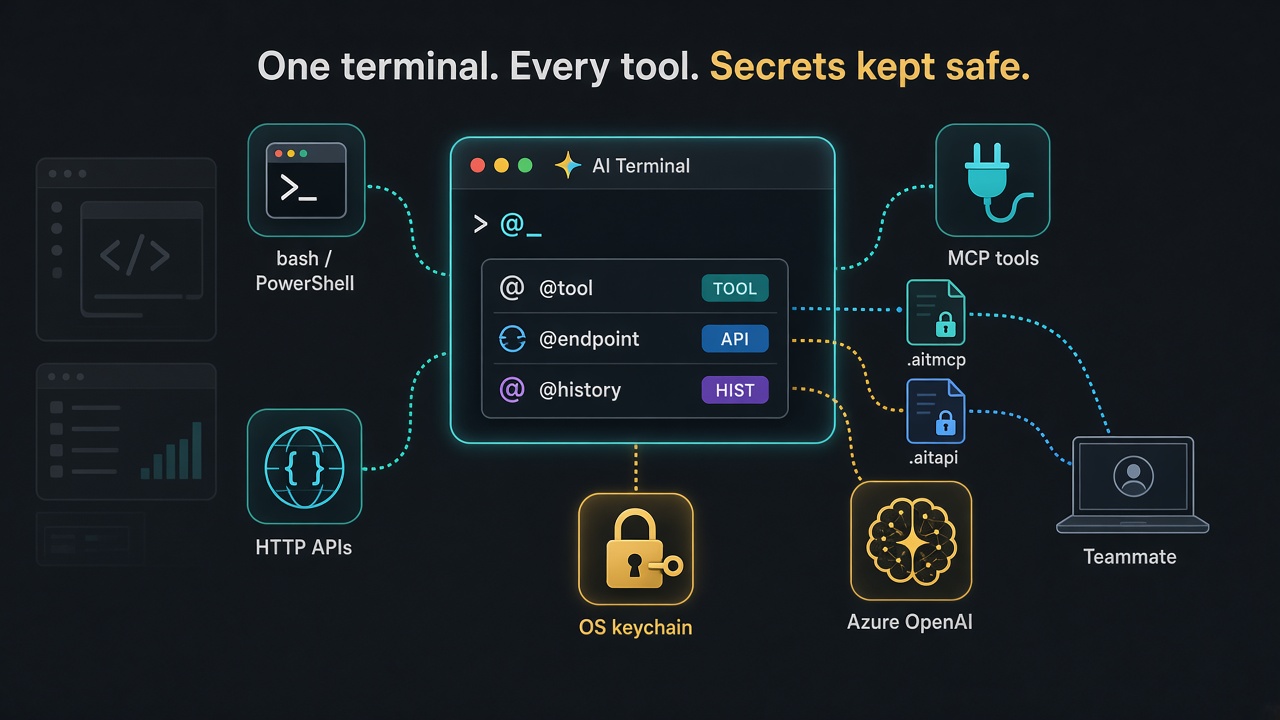
One prompt, four kinds of work
A shell line, an HTTP call, an MCP tool, or a model, from the same place. The scrollback records which one ran and how long it took.
- 2
Agent, in the prompt New
Turn it on and the line is chat. A line that starts with
Ask the model@still runs. The system prompt is in Settings. - 3
A collection is a runbook
Favourites run first. A capture fills the next line. A failed check stops the run.
- 4
termorq-cli, the headless runner New
The same collection, with no window. Checks, captures, and secrets included. JUnit for GitHub, GitLab, and Azure DevOps.
Run a collection - 5
Secrets stay out of the diff
The file keeps a name or a vault reference. The value stays in the OS keychain, Azure Key Vault, or 1Password.
- 6
A workspace the team can review
@workspace savewrites pretty JSON under.ai-terminal/. You commit the diff yourself.
What you can do
Shell, tabs, and a real terminal
Bash, zsh, PowerShell, split panes, and an interactive PTY when a program needs a keyboard.
Read itHTTP APIs with checks
Save a connection once, call endpoints with flags, and stop a runbook when a response check fails.
Read itMCP tools
Connect HTTP, Azure, or stdio servers. Inspect tools, resources, and prompts before you call them.
Read itCollections as runbooks
Favourite lines run first. A capture such as method = $.method feeds the next line as {{method}}.
GitHub, GitLab, Azure DevOps
The same run writes JUnit. Secrets come from the pipeline, not from the repo.
Read itWhy termorq-cli is in this guide
Same engine
termorq-cli calls through the app library. A check that fails in the terminal fails in CI.
Secrets stay out of the file
The workspace stores a name and a vault reference. The value arrives as AIT_SECRET_… or from Azure Key Vault or 1Password.
A result your forge already understands
Text for a person. JSON or YAML for a script. JUnit for GitHub, GitLab, and Azure DevOps.
Run a collection
Build termorq-cli
From a checkout of this repo. The binary does not open a window.
cargo build --release --bin termorq-cli --manifest-path src-tauri/Cargo.tomlPoint at the workspace
The path is absolute, or it starts with ~. A relative . is rejected.
termorq-cli list --workspace ~/src/acme-apisCheck before you call
Missing secrets and unknown endpoints are blocking. Nothing is called.
termorq-cli check Smoke --workspace ~/src/acme-apisRun
Exit 0 is a pass, skips included. Exit 1 is a failed step. Exit 2 is configuration.
termorq-cli run Smoke --workspace ~/src/acme-apis --env Staging --format junitFive things worth learning first
One prompt for four kinds of work
Type a shell line, @endpoint, @tool, or @chat. The scrollback marks which one ran, how long it took, and the HTTP status.
A collection is a runbook
Favourites run first. Captures fill {{name}} on later lines. A failed check, a non-zero exit, or Ctrl+C stops the run in the app.
Secrets are not in the git diff
Keys go to the OS keychain. A team folder keeps akv:// and op:// references. Save refuses a file that still contains a token.
termorq-cli is that runbook, headless
Every subcommand, the secret rules, and a pipeline for GitHub, GitLab, and Azure DevOps.
A workspace your team can review
@workspace save writes pretty JSON under .ai-terminal/. You commit the diff yourself. The app does not push.
The guide is ready to read.
Install, the window, HTTP, MCP, models, the team folder, secrets, and termorq-cli in a pipeline.